In part 1 of this series I’ve used this blog as a quick test of Netcup’s tiny and cheap VM offer that I have come quite fond of in the meantime. So it was time to move a ‘real’ application to it I was running on a more expensive VM in a different data center: My TURN server for which I have quite stringent packet jitter requirements.
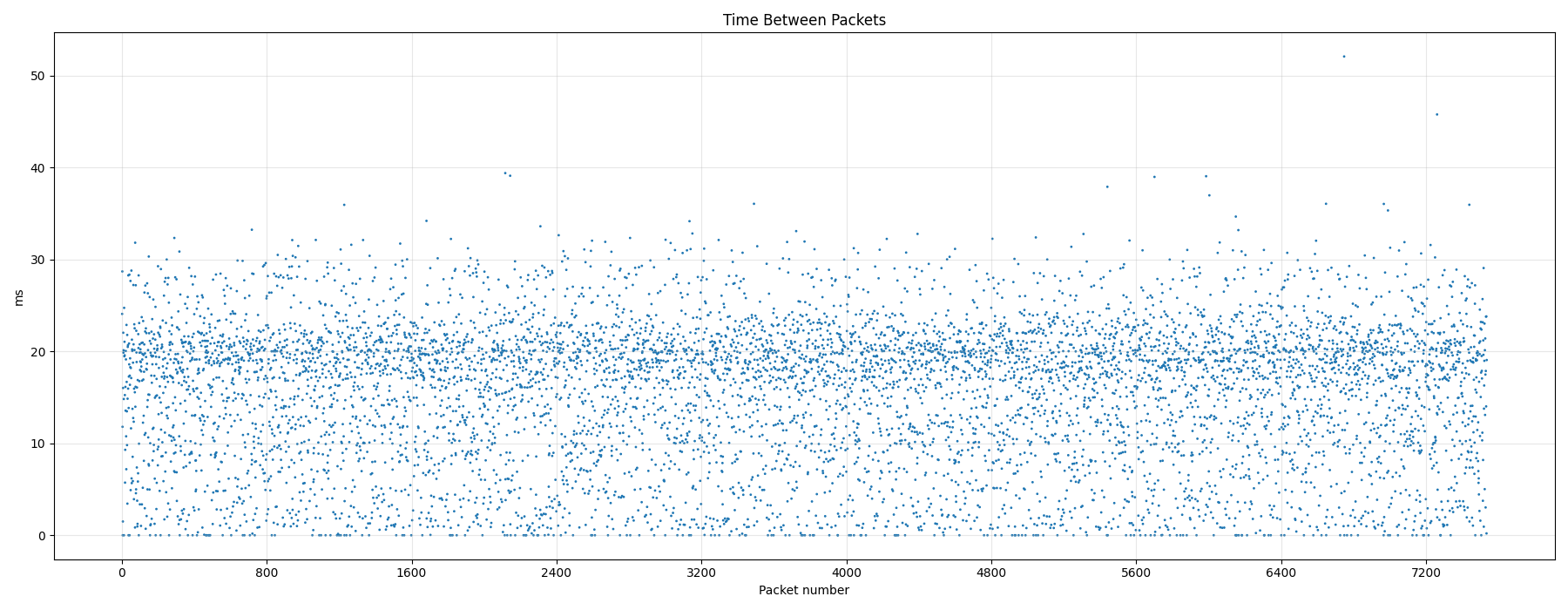
As part of my own XMPP and voice calling infrastructure, I run a TURN server that acts as a gateway between two devices that can’t communicate directly due to Network Address Translation (NAT) on both ends. In another recent blog post, I’ve described how to visualize the inter-packet spacing and jitter between voice packets and how it looke like when packets where forwarded by my previous TURN server. Obviously, I need the same consistent jitter behavior from my new Netcup VM for my voice calls. To see how the new setup behaves, I dumped the IP packets of a 2 minute voice call to a pcap file and visualized the inter-packet spacing as described in the post I linked to above. The result looks the same, the jitter of my voice call via the Netcup’s server, VM and interconnect is just as good as for my previous setup.
Fun fact: For the graph above I made the voice call with the Conversations XMPP messenger/voice app on Android while roaming with my German SIM card to the UK and being in the EE network. That means that jitter is absolutely fine even when an additional roaming network and a roaming backhaul to Germany is involved.
And with this in the bag, I can officially move my TURN server to the new data center!