I was hoping that waiting 4 months after the release of Ubuntu 26.04 would mean that most stability issues were out of the system. But it seems there are still quite some irritating things left as this is already part 3 in this series.
Today’s issue: When I’m logged into a remote Ubuntu 26.04 notebook via Remmina on my side and the default Remote Desktop feature of Ubuntu 26.04 on the notebook’s side and leave the RDP connection running while I suspend, I only get a white screen after a resume when establishing a new RDP session. Even worse, the notebook’s audio subsystem doesn’t re-initialize properly anymore after resume, and no sound is played anymore. The syslog is then continuously spammed with a lot of error messages including this one:
sof-audio-pci-intel-mtl 0000:00:1f.3: snd_sof_boot_dsp_firmware: failed to boot DSP firmware: -110The only way to get out of this is to reboot. Another fun fact: It doesn’t happen always, but I can frequently reproduce it one notebook. On another notebook it doesn’t happen at all. After 5 hours of trial and error, I finally found the reason and a fix for it.
The fix is actually quite simple: I use Remmina on the client side and the issue goes away by setting the “Audio output mode” of the connection profile to “Remote“. Remote in this case means that no audio is requested by the client (which is seen as the remote side in this logic) from the server side.
So how does changing this setting change things on the notebook side, i.e. the RDP server side? When the default RDP connection audio setting is used, RDP establishes audio sinks on the notebook (RDP server) side, so the audio can be transported over the network to the Remmina side. On suspend, the Linux kernel properly closes down the hardware sinks of the built-in hardware speaker, but not the software sinks of the RDP connection. On resume, these software audio sinks are still present and prevent the re-initialization of the audio DSP. One can see the difference between audio and no-audio for the RDP connection with the following shell commands on the RDP server side:
sudo apt install pulseaudio-utils

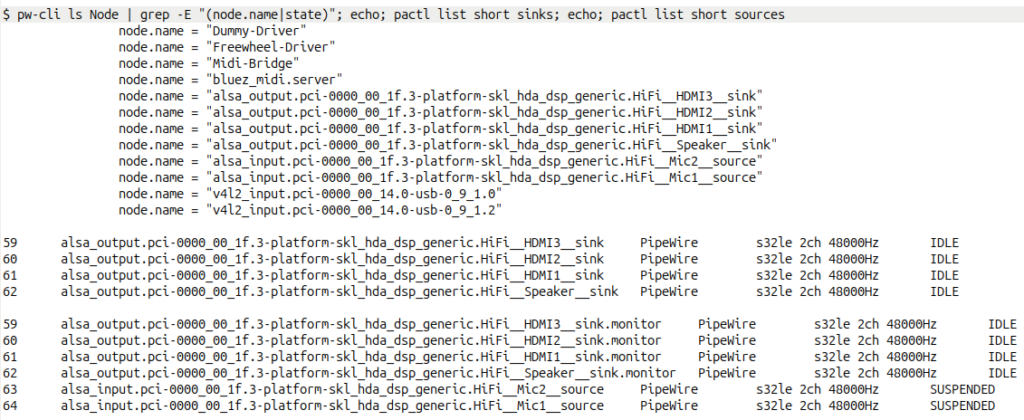
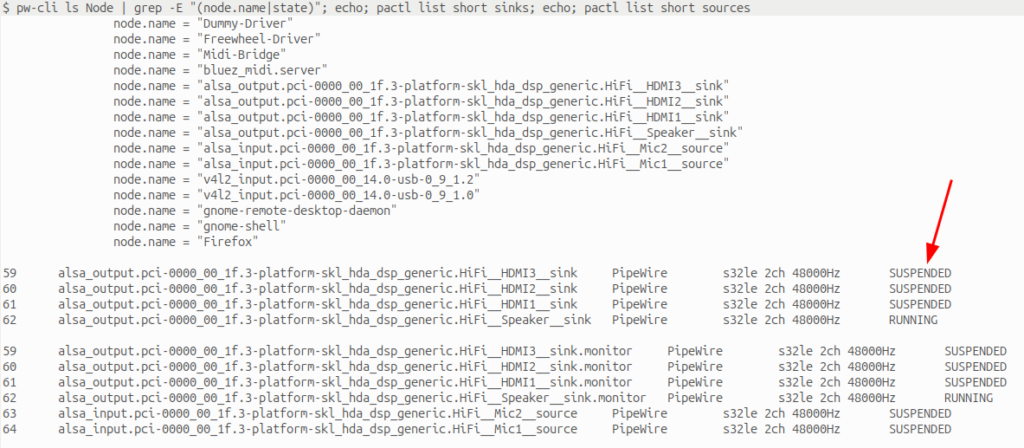
pw-cli ls Node | grep -E "(node.name|state)"; echo; pactl list short sinks; echo; pactl list short sources
With the default RDP audio being active, the hardware speaker sink and the speaker monitor are in RUNNING state, while a number of other sinks are in IDLE state, which means they are connected (by RDP) but not used. This is shown in the screenshot above. And on suspend, they stay IDLE and are not SUSPENDED. Which then creates the audio DSP init issue when the system comes out of sleep. By deactivating audio for RDP in the Remmina connection settings, all of this does not happen and the audio DSP is re-initialized correctly after resume. This is shown in the screenshot below. The audio sinks are also there but in SUSPENDED state, which is no problem for suspend/resume.
So why does this issue only appear on one notebook (a 2025 Lenovo T14 Gen 6, Intel) and not on the other (a 2020 Lenovo X13, AMD)? It turns out that my other notebook’s audio hardware is different and the software sinks that are created by the RDP server on connection establishment are never created there, hence there are no hanging audio sinks on resume, even if the client has audio configured for the RDP connection.
The Remmina default audio settings don’t create an issue on the other side if the RDP connection is closed at least 5 seconds before the notebook goes to suspend state. So why 5 seconds!? Because that’s the time the audio system in Ubuntu 26.04 keeps those software sinks for RDP in place before they are shut down. So that’s why it the issue appeared only sometimes, it’s just a question of how much time passes before the lid is closed to enter suspend. This can be nicely observed by issuing the commands above after ending the RDP connection.
Fixing this on the Remmina client side even though Remmina is not responsible for this at all works for me, because I’m the only one using my notebooks remotely. But from a general point of view this is far from ideal, as a wrong client setting can crash the audio setup of the notebook on the other side during a suspend/resume, which then requires a reboot to fix.
And before I close, here’s some further background information: In the first 4 hours of this trial and error session, I tried to fix this on the RDP server side. I put systemd services together to shut down the Remote RDP service, kill running RDP sessions and even terminating processes the had the RDP TCP port open, but nothing helped. After running out of options, I started thinking out of the box and started to look on the client side, i.e. the Remmina client RDP audio settings. Which brought success immediately. In hindsight, all of my server side fixes couldn’t work because the sound subsystem keeps the offending audio sinks open for 5 seconds, even if the RDP processes are removed. With this knowledge, I could perhaps now change those scripts to wait 5 seconds before suspend continues. That’s a task for another day, though.
To the best of my knowledge, this issue and solution is not documented anywhere yet. This might be because the issue likely only appears on relatively new hardware (my Lenovo T14 G6). And this is probably the reason why several AI models I used for analyzing the problem couldn’t come up with a solution, despite spending 4 hours and a hefty amount of tokens on the issue. Also, ‘ordinary’ web searches didn’t come up with anything related to RDP and suspend/resume. The closest issue description I could find is this one, but it doesn’t mention RDP and disabling audio for the remote screen sessions to fix it. Good or bad, but I’m happy my out of the box thinking finally brought a solution.