After having had a first look at MeshCore in the previous post, here’s a follow-up on how to actually flash software to devices. This used to be a bit tricky, as flashing devices over USB in the past typically required downloading a binary for the device and an app to flash the device from a PC or notebook. Then, Web Serial for web browsers came along. Until now, I’ve never used it and always preferred the manual way. MeshCore offered the perfect opportunity to give Web Serial in the web browser a try and learn. I was expecting a bit of resistance and a steep learning curve, and was surprised that what I got instead was an easy process and a working device in 2 minutes.
I’m not sure if it was necessary or not, but to be on the safe side, I added my account on my Ubuntu notebook to the ‘dialout’ group to have access to serial ports (over USB):
sudo usermod -aG dialout $USERAfter a quick reboot I, gave the MeshCore Flasher a try in Firefox on Ubuntu 26.04, as Mozilla has added support for Web Serial in May 2026. And it was really easy:
- Connect the device to the notebook
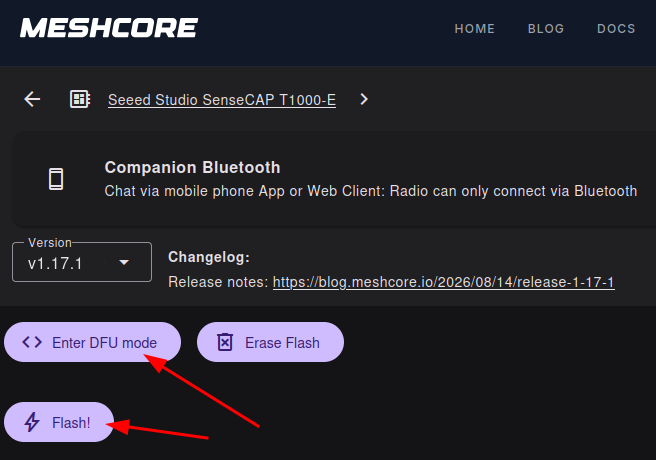
- Select the device type in the list shown on the MeshCore Flasher page in the browser
- Click on the ‘Enter DFU mode‘ (i.e. connect to the device) button
- Select the USB/Serial interface to use from the list the browser shows.
- Click on the ‘Flash‘ button.
- Done!
If the device is flashed as a MeshCore Companion, it is now ready to be configured. This is done in the Companion app on Android/iOS by connecting to the newly flashed device over Bluetooth. Easy! If the device was flashed to act as a MeshCore Repeater, initial configuration is done in the Web browser after the flash procedure. Even easier, as no app is required.
Wow, that was much easier than I thought!