Hm, perhaps a bit of a boring headline, but as my new printer worked out of the box without any configuration required, I was wondering how this could work, as Ubuntu 22.04 I currently use is older than the printer model.
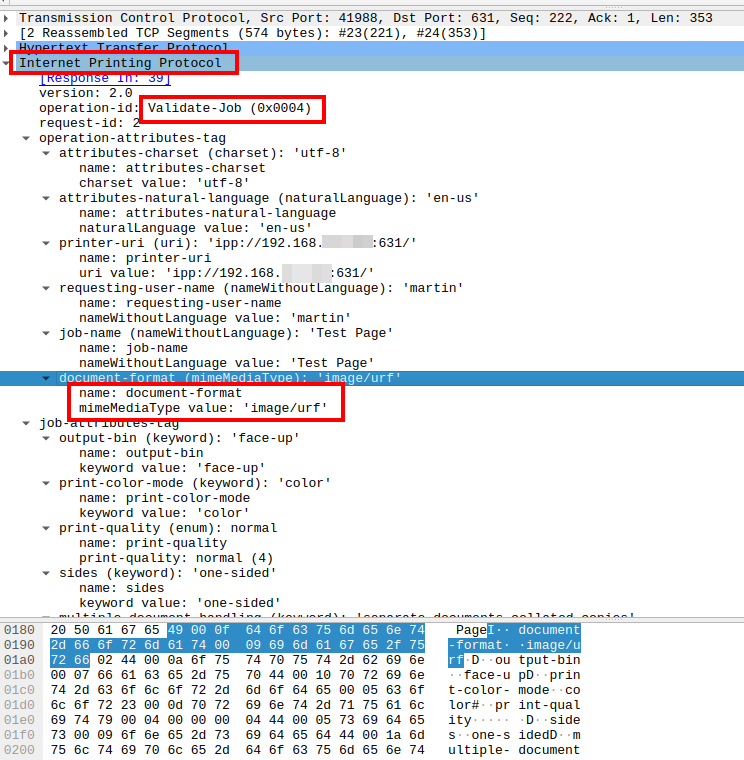
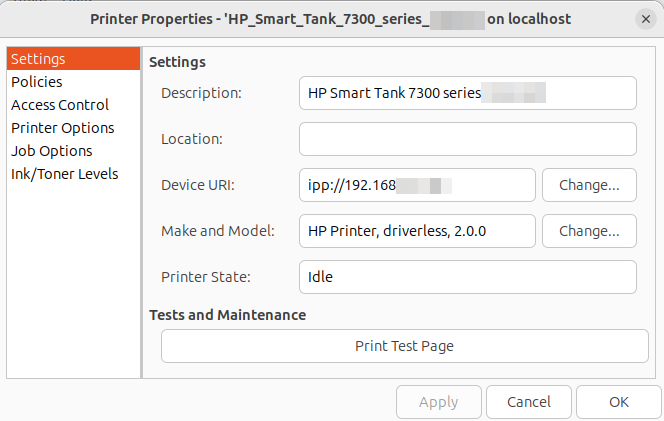
As my printer replacement cycle exceeds a decade, I was not quite up to date on this topic anymore and after digging into the topic, it seems that there are two main reasons it was working out of the box on Linux: Apple picked up and evolved the CUPS printing specs used by Linux already for some time, and all operating systems, including Android/iOS started using the Internet Printing Protocol (IPP) as a standardized way to talk to printers. The result: No manufacturer drivers required anymore. OK fine, I thought, so how does it work?
Standardized Protocol
The main building blocks are Multicast DNS (mDNS) to find printers in the local network and the Internet Printing Protocol (IPP), which is an http based protocol to get printer attributes and to send print jobs. There’s IPP, which sends information in the clear, and IPPS for encrypted communication with the printer. By default, IPPS is used, but Linux allows to easily configure a printer manually with the unencrypted version so it’s easier to trace with Wireshark.
Standardized Formats
A standardized protocol to communicate with any kind of printer is nice, but the second ingredient to print something without a specific driver are standardized formats to send documents or pages to the printer. This part was included in IPP Everywhere, released in 2013 and now universally supported by printers.
I used an AI LLM to find out more about this and the outcome was that the PDF format is supposed to be supported by all IPP capable printers today. I was a bit skeptical when I read this, as PDF is a relatively heavy document description format and I was wondering if cheap printers with relatively little processing power would really implement this. I have three different printers made by HP at home and only one of them, the Laserjet, implements PDF. The others, including the brand new HP Smart Tank 7303, do NOT implement PDF. Instead, other standardized raster based formats are used, jpeg is in the list, plus some HP proprietary formats. This means that the client, i.e. the notebook or smartphone converts any kind of document, including PDF documents to a raster based or a jpeg image and sends the result to the printer. This seems to be the standard way of doing things rather than using PDF. The PWG confirms this on their web page:
Required: IPP/2.0, DNS-SD, PWG Raster and JPEG JFIF file formats (JPEG only required for color printers)
Recommended: PDF, IPP-USB
If PDF is offered, it is used, even from my Pixel 8 smartphone, but it seems to be the exception rather than the norm. As three HP printers are not very representative I have asked others to send me the printing formats of their printers. I got 3 responses, two from people with Brother printers and one from a person with an Epson printer. None of them supports PDF as IPP printing format. So the AI LLM claiming PDF is the universal printing format these days is just plain wrong.
Command Line Setup
To check how universal IPP everyhwere is, it’s possible to set up a driverless printer on the Linux command line without specifying any manufacturer specific details. There are two flavors of this. The first one requires no knowledge of the printer’s IP address:
# The following command returns URIs of all
# driverless printers found on the network
#
driverless

# Create the printer (queue)
#
lpadmin -p test-del -v <URI-RETURNED-ABOVE> -E -m everywhere
If the IP address of the printer is known, it’s even more compact:
lpadmin -p my-printer-name -v ipps://192.168.xxx.xxx -E -m everywhereIn both cases, a new printer is created which becomes visible when the printer list in the GUI is closed and reopened. For details see here. Replace ipps with ipp to get plain text communication over the network for Wireshark tracing!
Details
And for completeness sake, here are the printing formats supported by the 6 printers I have the information on, supplied by the Linux ‘ippfind -l‘ and ‘ipptool -tv ipp://YYYYYYYYYYYY:631/ipp/print get-printer-attributes.test | grep “document-format|printer-make-and-model‘ commands.
Fun fact: The only format supported by all printers is jpeg. The pwg-raster format is a close second, supported by all but the HP Laserjet.
HP 6950, ink printer
document-format-default (mimeMediaType) = application/octet-stream

document-format-supported (1setOf mimeMediaType) = application/vnd.hp-PCL,image/jpeg,application/PCLm,image/urf,image/pwg-raster,application/octet-stream

document-format-version-supported (1setOf textWithoutLanguage) = PCL3GUI,PCL3,PJL,Automatic,JPEG,PCLM,AppleRaster,PWGRaster

pdf-versions-supported (keyword) = none
HP Smart Tank 7303, ink printer
document-format-default (mimeMediaType) = application/octet-stream

document-format-supported (1setOf mimeMediaType) = application/vnd.hp-PCL,image/jpeg,image/urf,image/pwg-raster,application/PCLm,application/octet-stream

document-format-version-supported (1setOf textWithoutLanguage) = PCL3GUI,PCL3,PJL,Automatic,JPEG,AppleRaster,PWGRaster,PCLM

document-format-details-default (collection) = {document-format=application/octet-stream}

pdf-versions-supported (keyword) = none
HP Laserjet M188dw
document-format-default (mimeMediaType) = application/pdf

document-format-supported (1setOf mimeMediaType) = image/urf,application/PCLm,application/octet-stream,application/pdf,application/postscript,application/vnd.hp-PCL,application/vnd.hp-PCLXL,image/jpeg

pdf-versions-supported (1setOf keyword) = adobe-1.2,adobe-1.3,adobe-1.4,adobe-1.5,adobe-1.6,adobe-1.7,iso-19005-1_2005,iso-32000-1_2008
Brother MFC-L2700DW (b/w laser)
document-format-supported (1setOf mimeMediaType) = application/octet-stream,image/urf,image/pwg-raster

document-format-default (mimeMediaType) = application/octet-stream
Brother HL-L3270CDW series, a color laser printer
document-format-supported (1setOf mimeMediaType) = application/octet-stream,image/urf,image/jpeg,image/pwg-raster

document-format-default (mimeMediaType) = application/octet-stream

document-format-preferred (mimeMediaType) = image/urf
EPSON ET-4850 Series, Ink printer
document-format-default (mimeMediaType) = application/octet-stream

document-format-preferred (mimeMediaType) = image/urf

document-format-supported (1setOf mimeMediaType) = application/octet-stream,image/pwg-raster,image/urf,image/jpeg,application/vnd.epson.escpr
Final Thoughts
I ran a number of tests with my 3 printers, my Pixel 8 for mobile printing as well as my Ubuntu 22.04 notebook, and could detect jpeg, raster and pdf formats being sent to the printers depending on the combination. Also, I could see in one trace that HP’s PJL (Printer Job Language) protocol was used, which sits between IPP and the page information. In other words, there was no ‘one format rules them all’ approach, so the universal printing approach still uses a number of open and proprietary protocols. But it seems the number of protocols and combinations are few these days, and there is IPP / JPEG as a single common denominator when all else fails, which seems to ensure that driverless printing out of the box on Linux over the network runs quite well these days.