For me, like most people, the everyday default use case for LLMs is to get answers to questions, i.e. I use it as kind of an enhanced search engine. So far, my experiments with local LLMs have focused on getting answers out of what the LLMs have learnt during the one time learning phase, i.e. what is ‘stored’ in their ‘weight’ parameters. While this works, there are two major shortcomings: First, information about current events is not available, as the training phase was in the past. And secondly, there are no references to check if the information returned was correct. In many cases, the information is correct, but there are also spectacular hallucinations that sound credible but are just plain false. This is why many online LLMs such as Perplexity can combine their training with web search and give references in their output, so the information that was given can be verified. This is what is referred to as Retrieval Augmented Generation (RAG). It’s not a panacea, but it helps quite a bit. So my obvious next step: How can I get RAG working with my local Ollama and Open WebUI installation in a privacy friendly way?
Open WebUI RAG Setup
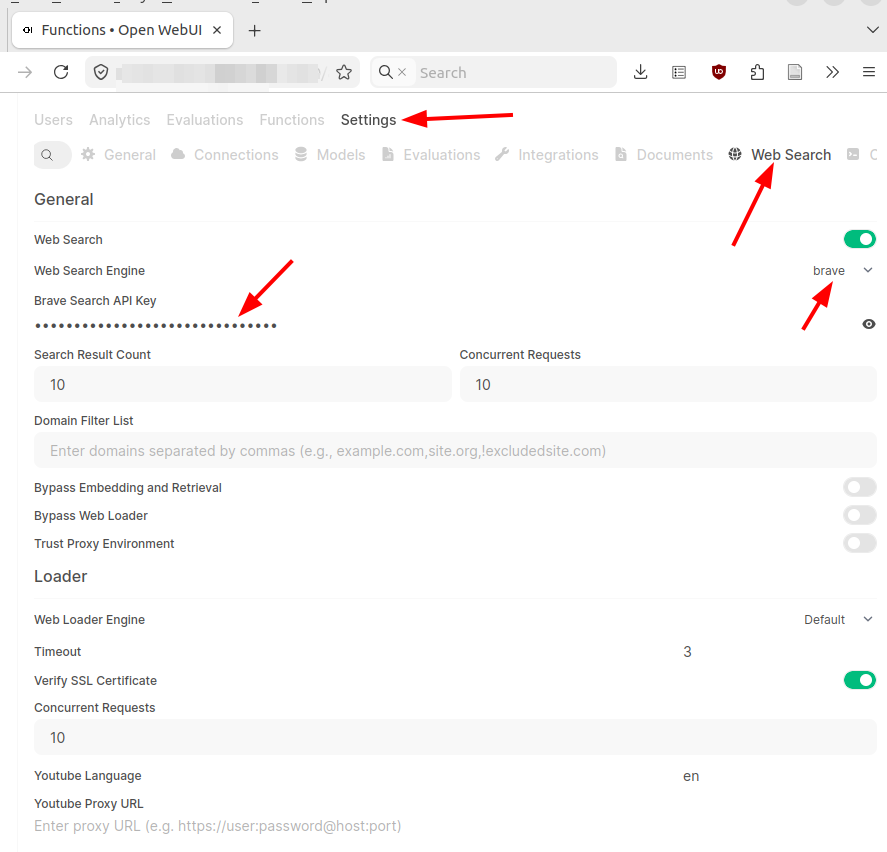
Fortunately, this is quite easy. In the admin settings, Open WebUI has a ‘web search’ section where an external search engine can be configured to do the ‘search’ part of a RAG LLM setup. Many different search engines are available for searching and all have one thing in common: They require an ‘API key’ for automated access. Typically, search engines do not give out free API keys. In combination with respecting privacy, i.e. not storing search queries and results in a user profile, that’s OK for me. I had a look around and for my tests I chose to go for the Brave search engine. Brave charges $5 for 1000 search requests without recurring monthly subscription costs. You pay what you search for. 1000 web searches will serve me for a long time, so the pricing looks OK to me. After signing up and paying for my first 1000 searches, I could generate an API key and copy/paste it into Open WebUI’s API key field for Brave.
Asking my ‘Julius Cesar Questions’ Again
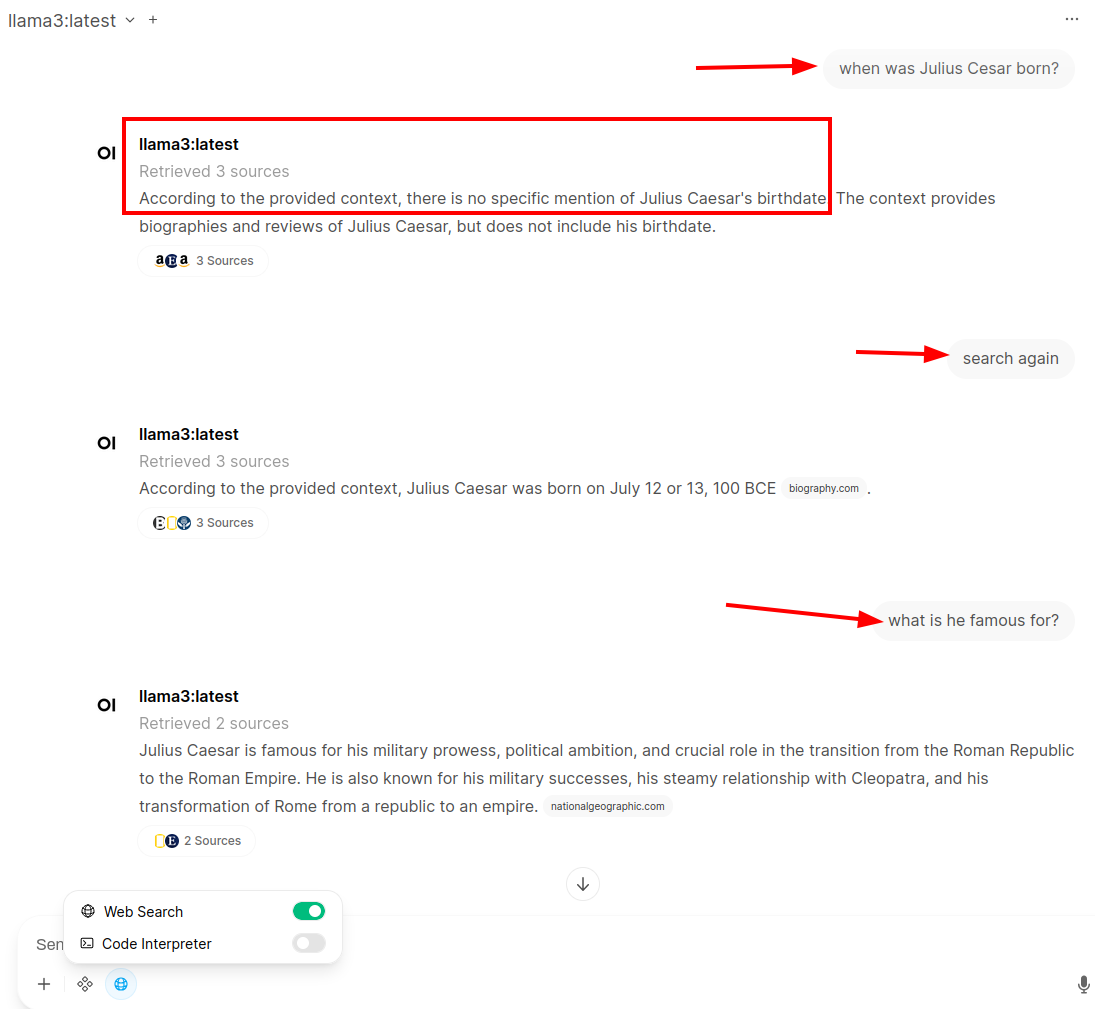
Once that is done, a ‘web search’ option becomes available when clicking on the ‘integration’ icon next to the ‘+’ sign (see screenshot above). To compare the output to an ‘LLM-only’ question from the previous posts, I asked once again when Julius Cesar was born and what he is famous for. While the search has worked, it looks like the system did not look at the correct sources and did not come up with an answer. But at least it did not invent something. So in the next prompt, I instructed the system to ‘search again’ which then came up with the correct birth date and link to a source to verify it. The next question about what Julius Cesar is famous for is much shorter than if the LLM had answered it without a web search. But at least the output can be verified. I had a quick look at what online RAG LLMs come up with for the second question and the result was quite similar.
Privacy Considerations
Running a local LLM is obviously good for privacy, as the questions and results are not spilled out into the world. But what about the search part in this setup? After all, an external company is used for the search. To stay as private as possible, I selected Brave, a privacy respecting search engine, which in turn asks other search engines. Those other search engines, however, do not get information on who asked the question. Also, Brave does not store search requests and results, so I’m satisfied that I can ask questions without personally identifiable information being stored somewhere. Also, I paid for the search request, so I was not the product that was sold to advertisement companies. There are probably other alternatives out there that might be even better suited to my privacy needs, but that’s something for a ‘hardening’ exercise a bit further down in the learning journey.
Next Steps
Now that I know how online web search works with local LLMs, it would also be nice to see how the same web search capabilities work with online LLMs. I’ll have a look at this question in the next post by using an online LLM instead of a local LLM in Open WebUI in combination with the private Brave web search I configured in this post.