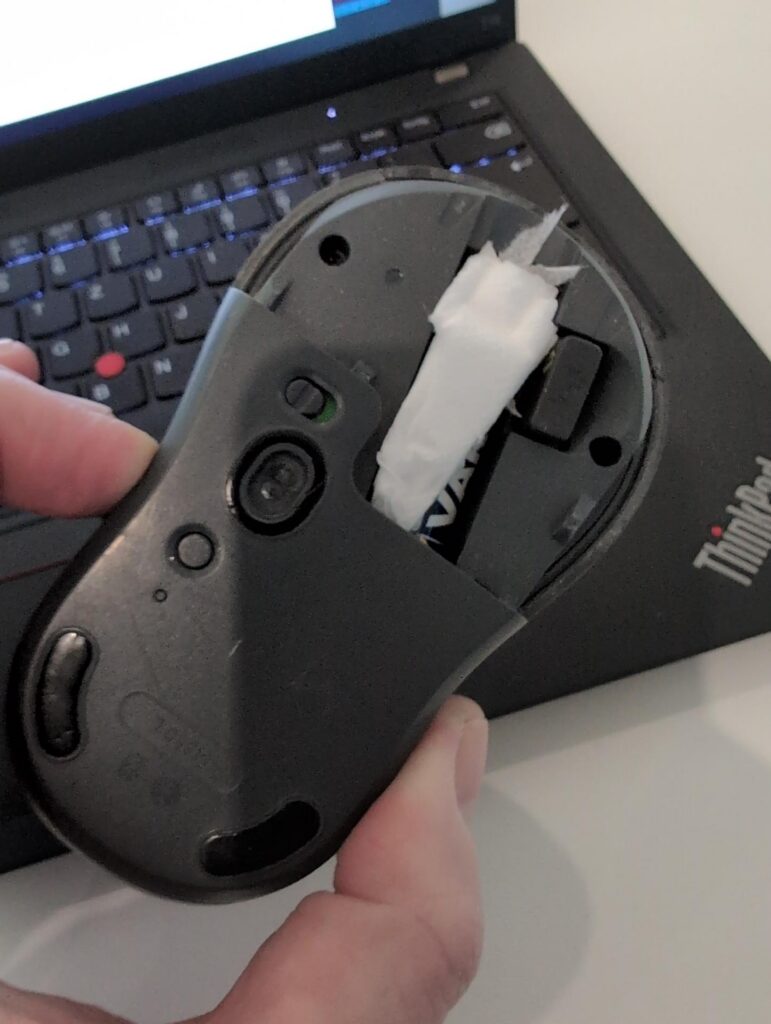
Here’s yet another ‘mouse’ story, these devices seem to be much more tricky to handle than they look, at least for me. So here’s the story: For the past few years, I’ve had this very strange behavior that when traveling, my mouse would work better on some surfaces than others. Particularly, when I would lift the mouse, move it and then put it down again, it would, on some surfaces, take a few seconds before it was working again. For several years I blamed this on the reflectance of the surface, as this behavior seemed to mostly happened on such surfaces. But over the years doubt has crept in if that was the real reason for this.
Let’s Dig Down on This
So at some point I had a closer look and noticed that this wasn’t the reason at all. The real reason was that the mouse reset when I put it down on a surface because the battery was disconnected for a short time. And it seems this happens on ‘harder’ surfaces more often than on softer surfaces. Or perhaps it has something to do with the angle of my arm and hand in relation to the table top and the resulting change in the force applied when I put the mouse down? Anyway, what I could reproduce with trial and error was that when I place my mouse on the surface lightly, it would continue to work without a 2-3 seconds outage. When putting it down a bit harder on the same surface, I had the outage. So in the end it has nothing to do with the ‘shininess’ of the surface.
The fix: I put a piece of paper on top of the battery in the battery slot so it can’t move anymore. This completely fixed the issue on any surface the mouse works on. What an interesting case of self delusion over a long time.