Over the years my use of Bluetooth for various purposes has significantly diminished. With the advent of Wi-Fi tethering that I wished for back in 2006 when the first phones with Wi-Fi connectivity were pioneered by Nokia (see here and here) and a few years later realized on the Android platform, my Bluetooth use became occasional at best. I tried Bluetooth headsets every now and then but was always disappointed with their range and I just don't listen often enough to music on my smartphone to have made it worthwhile to buy a Bluetooth enabled stereo headset. Also for transferring pictures or files from mobile devices to my PC or vice versa, Bluetooth was mostly not an option because I always needed a dongle on the PC side. The time this takes was usually the same as removing the SD card from the smartphone and inserting it into the PC or plugging in a cable to access the pictures from the simulated SD card provided by the generic SD card driver that Android provides. My new PC, however, now provides for the first time a built-in Bluetooth transmitter and due to no longer having to plug-in anything, I have found myself using Bluetooth again for quickly moving files and images back and forth if there is only one or two files or images involved in the transfer. A late renaissance of the technology as Wi-Fi direct still doesn't seem to take hold (see here, here and here).
Probing Layer 1 – Part 5: DVB-T Signals
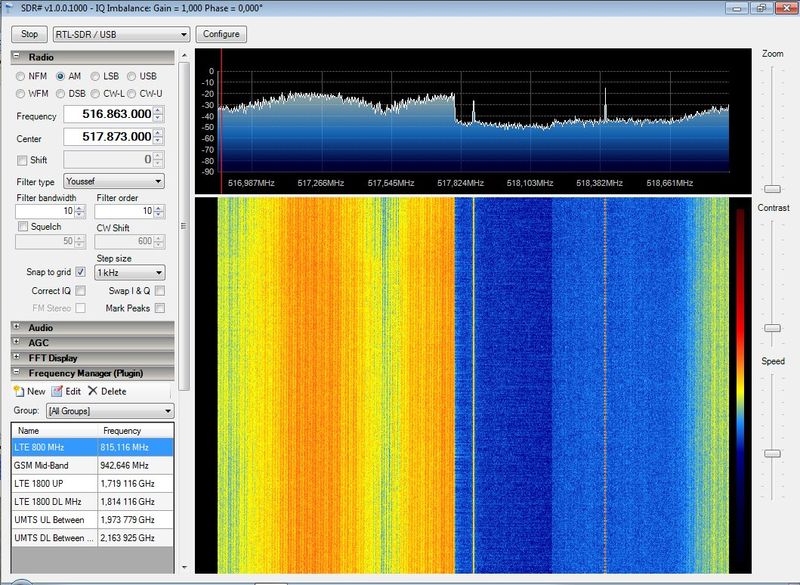 Venturing down a bit on the frequency scale I've now also taken a closer look at DVB-T television signals with my DVB-T USB receiver stick and SDR-Sharp. The image on the left shows the right edge of an 8 MHz DVB-T signal that encodes 4 television stations. Like in the LTE signals I wrote about in a previous post, there are also vertical stripes that can be seen in the waterfall diagram. The stripes are much narrower, however, likely due to the 1 or 4 kHz carriers used in the C-OFDM modulation of DVB-T compared to the 15 kHz OFDM carriers used in the LTE downlink. Interesting to note is that parts of the channel on the frequency axis are broadcast with more power than others. Not sure why, my understanding of DVB-T signals is very limited.
I was also quite baffled with how little of the spectrum assigned to terrestrial television is actually used today. In Germany, DVB-T can be broadcast in the 177.5 – 226.5 MHz range (i.e. a total bandwidth of 49 MHz) and between 474 and 786 MHz (i.e. a bandwidth of 312 MHz). That's 361 MHz in total or enough for 45 DVB-T channels. Despite DVB-T being a single frequency technology in which neighboring transmitters can use the same channel, not all can be used simultaneously as different TV stations are broadcast in different parts of the country. But even if only every second channel is used, that spectrum could still hold an impressive 90 TV channels. In practice much less is broadcast today and when scanning through the spectrum in Cologne, most channels were empty.
360 MHz is quite a sizable chunk of spectrum and as the popularity of DVB-T and terrestrial TV broadcasting is on the decline I can see why there are moves to re-assign the 694-790 MHz range for wireless Internet connectivity, i.e. for use with LTE and perhaps other wireless technologies in the future. The Wikipedia article linked above indicates that the additional band could be brought into operation by 2026. This would give network operators access to an additional 96 MHz of spectrum that, with a duplex gap of 11 MHz, would offer 42 MHz for downlink and 42 MHz for uplink data transmission. That's a bit more than the current digital dividend spectrum in the 800 MHz band bundled in LTE band 20. Here, 30 MHz of bandwidth is available in each direction and used by three network operators in Germany today.
The New Nexus 7 Tablet (2013) Supports AT&T, Verizon and T-Mobile LTE In One Device
While in Europe, GSM, UMTS and LTE are used by all network operators, the US wireless landscape has always been much more diverse. This meant and still means that there always had and have to be several device variants to support different networks. But with the advent of LTE and advances in chip technology this may be about to change.
When Google recently introduced the 2013 version of the Nexus 7 tablet, it upgraded the cellular hardware to support 7 LTE bands. For details see Google's page on the Nexus 7 and AnandTech's mini review over here which has a somewhat different frequency listing. Apart from the stunning number of supported LTE bands it also supports the five major UMTS frequency bands.
The LTE band combination for the US is especially interesting, as band 13 is included for Verizon's LTE, band 17 for AT&T's LTE and band 4 for T-Mobile's LTE. This might very well become the future trend and will finally allow US consumers the same flexibility as in Europe to buy a device independent of the network operator or even change network operators over the life cycle of the device.
I'm not quite sure how Sprint fits into this equation!? From what I can tell they have LTE up and running in a 1900 MHz band and have taken over Clearwire's 2500 MHz TDD assets. While the 2500 MHz TDD band is not supported by the device I have no information which band Sprint uses with it's 1900 MHz assets. If you have some more information on that, please leave a comment.
Also interesting is the absence of CDMA support in the tablet. Probably not surprising for a tablet, as mobile telephony, if implemented on the user interface at all, is not a prime use case for a tablet. Also, unlike UMTS with it's great data rates, CDMA EvDo only offers limited speeds which are undesirable in a data heavy product as well. So why bother?
40% of UMTS Band 1 is Unused
While in the US, network operators were perhaps struggling with the amount of spectrum they had for their 3G services and thus rushed to jump onto the LTE bandwagon, Europe continues to enjoy very good data rates over 3G UMTS to this day (for details have a look here for example) in addition to the massive additional capacity now available on other frequency bands with LTE. So I was wondering a bit how much for the UMTS 2100 MHz band 1 spectrum is actually used today.
Cologne is one of the bigger cities in Germany so it is fair to assume that it is also a place in which the highest number of UMTS carriers are needed to satisfy demand. In total, band 1 can host 12 individual UMTS 5 MHz carriers. In practice, however, SDR-Sharp and my DVB-T stick show quite clearly that only 7 of those are used today. In other words, 40% of the bandwidth available for UMTS in this band are still unused.
It's interesting to also look at how many 5 MHz slots each of the four network operators has in Germany in the prime UMTS band. The distribution is as follows:
- Operator 1: 2 channels
- Operator 2: 3 channels
- Operator 3: 3 channels
- Operator 4: 4 channels
Operator 1 has both channels on air and thus, LTE in other bands is the only way to increase available capacity.
Operator 2 and 3 also have two channels on air and in addition have deployed 10 MHz in band 20 for LTE. If necessary, they could still extend their UMTS capacity with one extra channel.
Operator 4 is only using one of its four channels so far! That's in line with that operator always trailing all other operators in speed tests by quite a bit. As that operator does not have spectrum for LTE in the 800 MHz band I would not be surprised if they started with LTE in the 2100 MHz band with a 10 or 15 MHz carrier.
Probing Layer 1 – Part 4: LTE Up- and Downlink Observed
After having taken a look at GSM and UMTS signals on the physical layer, this post is about how LTE signals are visualized by SDR-Sharp.
 In Germany we are in the comfortable position to have three network operators offering LTE services in the 800 and 1800 MHz bands so it is not difficult to find an LTE carrier signal. Like for UMTS, it's not possible to show the full 10 MHz (800 MHz band) or 20 MHz (1800 MHz band) LTE channel as the hardware and software are only capable of showing around 2 MHz at a time. But one can observe the edges of the signal or any particular part in between. The first picture on the left shows part of an LTE signal on the 1800 MHz band. All LTE signals I have observed feature the vertical stripes. While the stripes make sense due to the OFDM modulation using many individual 15 kHz carriers that for a 10 or 20 MHz channel I am not quite sure why there are strips that are marked in yellow while other parts are blue (i.e. a lower signal energy). I first thought that perhaps this might have something to do with the reference signals but they are evenly distributed through the carrier and are not only present in particular spots!? Another particularly interesting thing in the image is the reddish bars in parts which is actual data transmission occurring while I downloaded a web page. In other words, it's pretty easy to see on layer 1 how loaded a cell is.
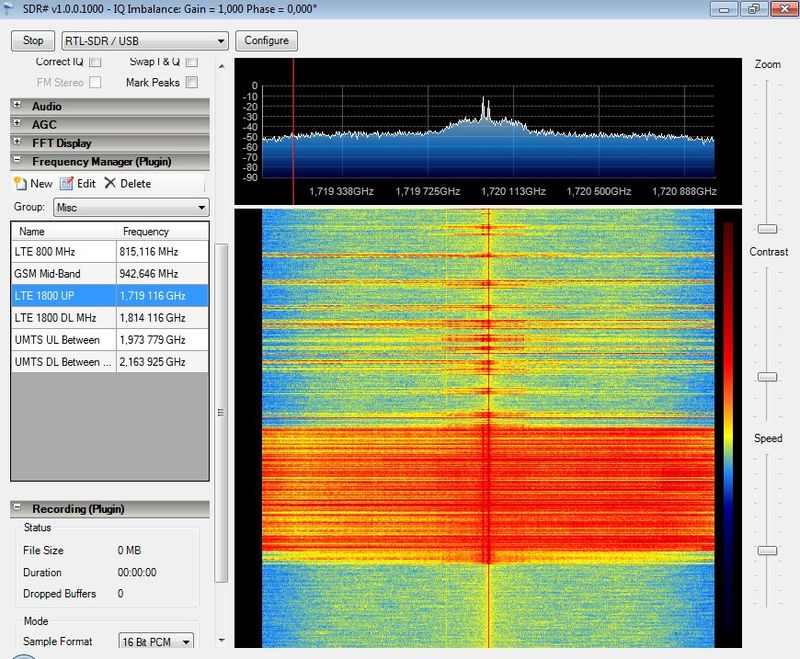 The second image on the left shows an LTE uplink transmission from my UE. Again, keep in mind that the image only shows a fraction of the total bandwidth used for uplink transmissions. The transmission starts in the lower part of the waterfall diagram and was again recorded while downloading a web page. Once the page was fully loaded one can see very nicely how uplink transmissions become spurious and at some later point, not shown in the image, cease completely. A further detail worth mentioning is the absence of the vertical strips compared to downlink transmissions. This is because in the uplink direction SC-FDMA modulation is used.
Incredible insight gained with a 20 Euro DVB-T receiver and the power of open source SDR-Sharp!
Raising the Shields – Part 6: The Onion Router (TOR) on Android
In the previous post in my series on how to protect your privacy online I've looked at the TOR software which hides your location from prying eyes and encrypts all data right until the TOR exit node. I was delighted how easy it has become in recent years to install and use the package so the next logical step was to see how usable the Android variant of the package has become.
Installation of TOR on Android is straight forwarded. All that is required even on non-rooted devices is to install Orbot for the basic TOR functionality and Orweb, the web browser that uses Orbot. Both are available from app stores or can be installed directly from here and here.
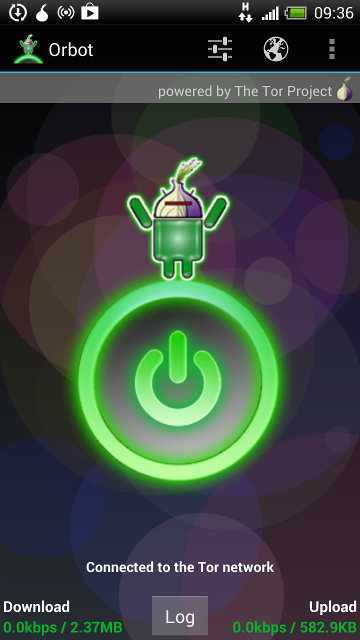 On non-rooted devices only the Orweb browser uses the TOR functionality provided by Orbot so all other applications continue to work as before and are obviously as unprotected as before. This can be both good and bad depending on the usage scenario. If TOR is only to be used for specific privacy sensitive web browsing sessions then this is the best setup as all security measures are automatically taken care of such as Java script being disabled, use of a generic browser ID when contacting web sites to prevent browser fingerprinting, no use of persistent cookies and no Flash. While this is perfect for privacy, such settings are likely to stand in the way for many everyday usage scenarios that are perhaps a bit less privacy sensitive. For these, the standard browser can be used as before as no settings are changed and Internet access is as direct as before.
If Orbot is installed on a rooted Android device it can be used as an Internet proxy just like on the PC and all programs that are capable of standard proxy functionality can use a TOR tunnel. This way, mobile email, instant messaging and other applications can be protected as well.
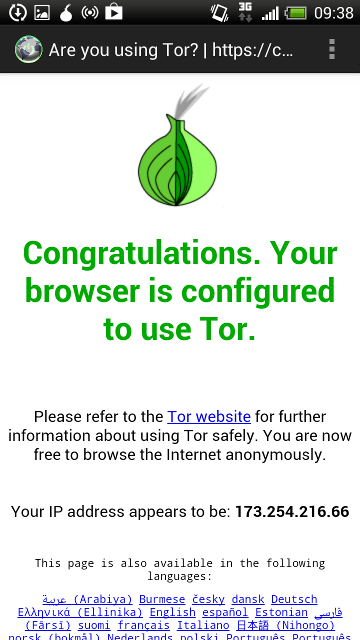 When starting Orweb, it offers the user to also start the Orbot background app if it hasn't been started before. After a couple of seconds the secure TOR tunnel is established and while using TOR has somewhat of a a speed impact I found it entirely usable. Unfortunately there are some usability restrictions introduced by the privacy model. There's no browsing history in the browser from which a previously visited website can be quickly reached and there are also no bookmarks. While I can understand both measures I think there should really be a bookmark feature even if it is a compromise, perhaps with a warning to the user that using bookmarks could reveal privacy sensitive information when the device is stolen. A solution to the problem could perhaps be bookmarks stored somewhere on the web anonymously and reachable via a short bit.ly link?
To sum up, I found TOR a great privacy protection tool for mobile use. It's easy to install and use but as on the PC, privacy and security means there are some usability limitations. I therefore prefer using TOR like on the PC in a two browser setup, one for my standard web browsing needs and another one for stuff where I would like to guard my privacy.
Probing Layer 1 – Part 3: Further Thoughts on GSM 900 Use in Cities
Two years ago I used a mobile phone that could show me the GSM frequency channels to find out whether all GSM network operators in Germany make use of the GSM 900 MHz band. While the original two GSM network operators obviously made good use of their beachfront property, the other two network operators that came later and at first only had 1800 MHz spectrum made little to no use of the 900 MHz spectrum. With my SDR-Sharp + DVB-T Stick Layer 1 utility I now revisited the topic to have a look at the complete band owned by the original 1800 MHz carriers in the 900 MHz band to see if I had overlooked something or if something had changed in the meantime.
The result is pretty much the same as two years ago. One of the two operators makes a bit of use, I could observe at least one or two carriers in their 5 MHz part of the spectrum in Cologne (i.e. in the city). This is very little compared to the two original GSM network operators that have many many cells on air in the same amount of spectrum.
The second original 1800 MHz operator still doesn't seem to make any use of GSM 900 in Cologne. I could only see very faint 200 kHz signals and I am not quite sure what they are. Perhaps echos of other carriers nearby shown here by my tracing hardware which has its limitations? Or perhaps cells used outside of Cologne that are still visible here?
In any case, both make so little use of it that I wonder if one day one of them might just start with either a UMTS 900 or an LTE 900 carrier in this part of the spectrum.
A Duplex Gap Question – Answered
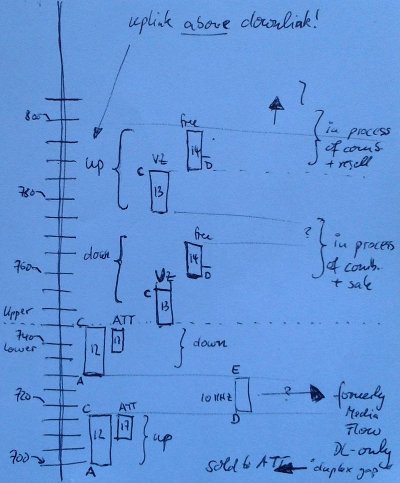 In my post yesterday I've been wondering if there are large wastelands of duplex gaps hanging around in the US 700 MHz band that is currently used only by AT&T and Verizon for 10 MHz LTE channels. I received two very good responses that made it clear that the duplex gaps I was seeing are actually not there at all. Instead what I was observing is a combination so far unused spectrum, unauctioned spectrum, overlapping bands and unidirectional spectrum that has been sold between the players recently. The situation is best described with a little diagram that I drew up on a napkin and shown on the left. Also have a look at the diagrams in this post which are more precise but have less information in them.
On the vertical axis I've drawn the 700 MHz frequency band in 5 MHz increments. There's the lower 700 MHz band and the upper 7000 MHz band separated by the dotted line about one third up in the diagram. The lower 700 MHz band is currently used by AT&T for a 10 MHz LTE channel in what is called the 3GPP Band 17 or B+C block in FCC speak. Band 17 is a subset of band 12 which is 2×15 MHz (note: the scale of band 12 and 17 in my drawing is not quite accurate, 17 should be 2/3 the size of band 12 but is drawn a bit smaller). The reason for the sub-banding is quite interesting and described in more detail in this post which I was pointed in one of the comments to my post yesterday.
The 10 MHz duplex gap in the lower 700 MHz band is the FCC D+E block and was bought by Qualcomm for their MediaFlow streaming services. The service never saw the light of day and in the meantime, Qualcomm has sold the 10 MHz patch to AT&T who plans to use the spectrum one day for LTE with LTE-Advanced Carrier bundling. That leaves me wondering a bit of how much of this spectrum will be usable as I suppose at least some gap is required between the uplink and the extended downlink. But AT&T paid close to two billion dollars for it so I guess they knew what they were doing.
The upper 700 MHz band is currently used by Verizon with a 10 MHz LTE carrier in what is called band 13 (The FCC upper C block). The gap between downlink and uplink contains band 14 which nobody wanted during the last spectrum auction and some additional spectrum that was never on the auction block at all. Also interesting in the drawing is that in the upper 700 MHz band, uplink and downlink are reversed from how it is usually done. This was done, from what I read between the lines to have band 17 and band 13 downlinks together to prevent interference between up and downlink of bands 17 (AT&T) and band 13 (Verizon).
To summarize: Yes, the large gaps I've been observing are there but they are not really unused duplex gaps but rather unused spectrum that might one day be taken into good use once AT&T figures out how to use Qualcomm's ex-Media Flow duplex gap spectrum in the lower band and once band 14 spectrum in the upper 700 band is sold.
A Duplex Gap Question
When I was recently looking at frequency band assignments to US carriers in the 700 MHz band by the FCC I noticed one thing that, from a European perspective, looks a bit odd. Perhaps somebody can enlighten me?:
LTE bands 12, 13, 14 and 17 in the 700 MHz frequency range are assigned to different network operators and each comes with an individual 20 MHz duplex gap. 10 MHz for uplink, 10 MHz for downlink and 20 MHz for the duplex gap, 40 MHz together. Multiplied by 4, that's 80 MHz for duplex gaps.
In Europe, band 20 in the 800 MHz range that is used by three network operators with 2x10MHz channels each only has a combined duplex gap of 11 MHz. To me that looks a lot more economical then spending 80 MHz for duplex gaps!? But perhaps I am missing something!?
Are those duplex gaps in the US used for anything or are they just wasted space?
Update: Thanks for the comments below, I have followed up on this thanks to them in this post.
Probing Layer 1 – Part 2: UMTS Layer 1 Visualization With SDR-Sharp
Since introducing SDR-Sharp in a previous post, I've had a lot of fun discovering a lot of stuff on layer 1 all throughout the spectrum. This post shows a couple of screen shots of UMTS carriers in the uplink and the downlink direction.
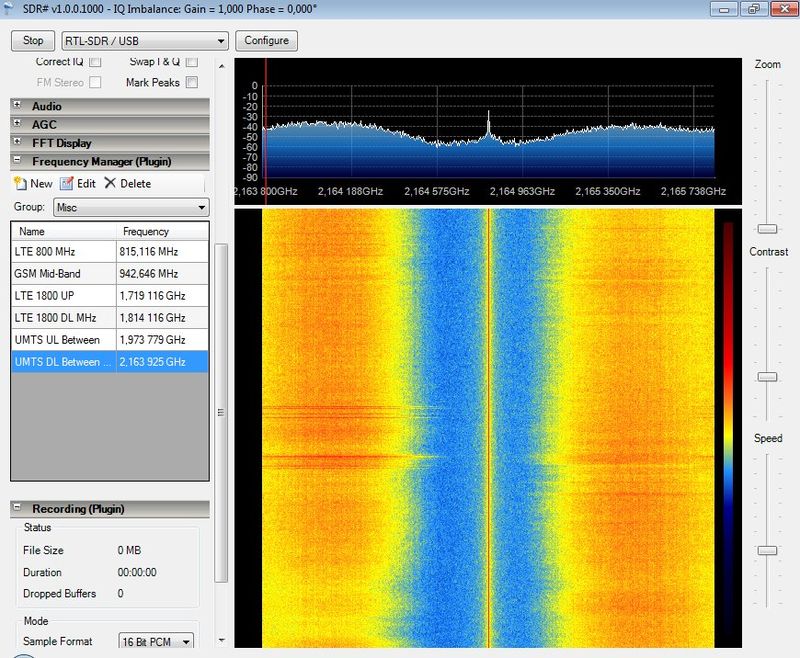 One limitation of the tracing solution is the maximum tracing bandwidth which is limited to around 2 MHz. While this is good enough to show several 200 kHz GSM carriers on the frequency axis it is by far too narrow to show a full 5 MHz UMTS carrier. But what it can show quite nicely are the signal flanks at either end of the 5 MHz channel or the gap between two 5 MHz adjacent carriers. The later is shown for the downlink direction in the first image on the left. Forget the pseudo signal energy in the middle of the diagrams as this is introduced by the hardware and is not received over the air. Apart from identifying clearly that there are two adjacent carriers on air the image also shows data transmissions on the two carriers. While taking this screenshot my mobile was on the left carrier and I downloaded a mobile web page which left the redder and broader streaks in the middle of the screen. As even this light load can be seen it can be assumed that at that time both carriers were pretty much idle.
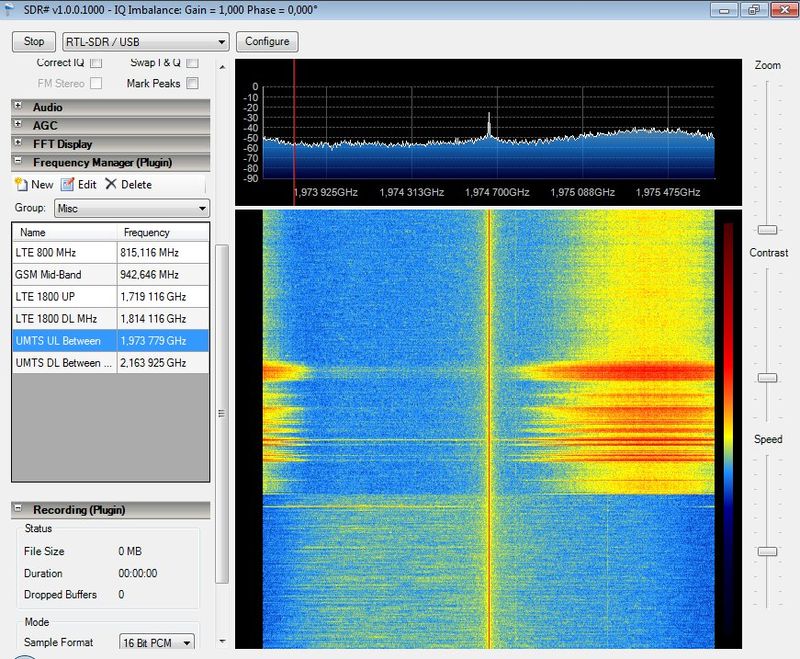 The second image shows the same channels in the uplink direction somewhat lower on the frequency axis. At the bottom of the waterfall diagram both uplink channels are unused. Then about 40% into the waterfall I clicked on a link in the web page to start a download. This requires data transmission in the uplink. In this case my mobile transmitted on the carrier on the right. There is some signal energy on the left of the waterfall diagram but this seems to be a reflection of the right carrier, again introduced by the receiver and not really on the air. One can also see quite nicely where actual data was transmitted (the red parts) and where only radio signaling information was exchanged with lower energy (the yellow parts). Also it seems my mobile was redirected as it started uplink communication on the left carrier (the somewhat more solid small yellow line) but the network then took the communication to the second channel.
In case you want to try yourself and wonder where to find UMTS carriers, this UARFCN calculator page gives you the needed details. Have fun!