Raising the Shields – Part 3: PRISM Break

It's quite obvious that privacy and anonymity doesn't come built into most computing and online products today. I hope my 'Raising the Shields' posts are giving you some ideas and background information what is possible and what you might want to use yourself both while mobile and at home.

While doing some research I came across an interesting site called 'PRISM Break – Opt out of PRISM, the NSA's global data surveillance program'. Lots of great links there to programs that protect your privacy online in areas such as web browsing, email, search (ever head of Duck Duck go!?), maps, instant messaging, voice and video calling, cloud storage, etc. etc. etc.

I immediately found half a dozen tools I haven't come across so far and that I definitely want to try out in the weeks to come. So head over and have a closer look!

Learning How Computers Work vs. How To Work With Computers

Nostalgia post – part 2. During the revival of my electronic kits use from my teenage years about which I blogged previously I stumbled over a 30 year old computer advertisement conveniently put on the back of one of the instruction manuals. No, we are not talking about computers as we know them today. No, this was an advertisement for a 4-bit (!) experimental computer, the Busch electronic 2090 microcomputer.

Based on a TMS-1600 processor and designed less than a decade after Intel produced their first microprocessor (the 4004) it would have been a dream for that 13 year old boy. Unbelievable nowadays when kids use "real" computers today before they even go to school. So that was my object of desire and today it feels like I would have willingly forgone 5 years of pocket money to get one. But I never got one, partly due to me not having the money to buy one myself and partly because I guess my parents had no idea why in the world they should spend money on this. Different times. Out of interest I did a bit of research of how much that Busch 2090 cost in the mid 1980's. I didn't find anything on the net at first but then I remembered that I have a few computer magazines from the 1980's in my cabinet that might contain an advertisement. And indeed I found an advertisement in the first C't magazine ever published in December 1983 from the manufacturer where the price was given as 299 DM (Deutsche Mark). With inflation and salary increases included I estimate that the price would be equivalent to what 300 Euros are worth in 2013. The magazine is available as a PDF from the publisher here. Have a look at page 26.

As can be seen in the only video on Youtube that shows the device, there's no keyboard as we know it, no screen, just a hex-input block and a 6 digit 7-segment display, 4k ROM and around half a kilobyte of RAM. Almost unfathomably little today. But it did one thing very well then and would still do it today: It shows how computers work (and not how to work with computers).

The manual that can be downloaded from the history section of the manufacturer's website teaches on only 80 pages the very basics of a computer. How does a microprocessor work, what is a bus, what's binary, what's the hexadecimal system and why it is needed, boolean logic, input and output, how does a microprocessor calculate, etc. etc. On 80 pages (including the code) and written in a way understandable for teenagers with no previous knowledge about the topic. Amazing!

Unfortunately these devices have become very rare. They were probably already rare 30 years ago as most kids probably experienced the same difficulties getting one as I did. So I keep my eyes open on eBay, perhaps I will get lucky one day. In the meantime I was wondering if there are equivalent learner kits today. Raspberry Pis are great for learning how to work WITH a computer, how to program it and to build many cool things. But it runs a full operating system, so everything is abstracted to such a level that it's difficult to use it for learning HOW a computer works. Arduino's might be better for the purpose perhaps but the way I understand the goal of that platform is that the software that comes with it again abstracts the underlying hardware to give people easy access to a device that can interact with the real world. That's great of course but again it doesn't teach people of how computers work.

When searching on my favourite web store portals I equally came up empty handed. Can it really be that today there are no computing kits for kids in their teens (or to grown ups that don't aspire to get a bachelor in computing but still want to know how a computer works) so they can learn how a CPU works and how it interacts with memory, input output devices and all the other magic!? It seems not but please prove me wrong, I'd really like to hear about it.

In the meantime I keep musing about whether perhaps an Arduino with an input/output shield, a hex keyboard and a 7-segment display combined with a software similar to what ran on the Busch 2090 could do the trick today. Open source for the enjoyment of parents and kids!?

Raising the Shields – Part 2: Certificate Patrol

In the majority of cases, https provides privacy and security by encrypting and decrypting data traffic to and from a web server. The mechanism is based on web server SSL (Secure Socket Layer) certificates and public/private keys that are exchanged during connection establishment. Data sent to the other end is always encrypted using the public key of the recipient. Decryption is only possible with the corresponding private key on the other side. This kind of encryption works as the private keys are never exchanged and hence nobody intercepting the data on its way from source to destination can decrypt the information. There is one weakness, however, most people are not aware about.

How does a web browser know that the web server's public key was actually sent from the web server and not from someone that sits in between the web browser and the server? For this purpose the web server sends an SSL certificate during the https session establishment that is signed by a certificate authority the web browser trusts. To get such a signed certificate a web site owner has to register with a certificate authority that web browsers trust. Unfortunately, there are a huge number of certificate authorities today that are trusted by web browsers and many are operated by what some would consider less than trusted entities. And here lies the weakness.

If a man in the middle gets hold of such a certificate authority he can create certificates for any domain on the fly. As a web browser does not check if the certificate authority for a web site has changed since it was last visited this goes unnoticed and opens the door to anyone that is able to perform a man in the middle attack with traffic diversion.

This is where Certificate Patrol, a Firefox add-on comes in. It stores certificates it has previously seen and compares them against the certificate presented by a website it has come across before. If they don't match a warning is shown to the user with the details. There are valid reasons for websites to exchange their certificates such as for example once their validity time has expired. This is also checked and Certificate Patrol informs the user that the certificate change was likely o.k. due to this reason. I've been using the add-on for quite some time now and it has become quite refined these days. I haven't come across fraudulent certificates so far but it feels good to know that I would see it should it ever happen. What's missing at this point is something similar in Thunderbird for ensuring the certificates for POP3 and SMTP email communication are not tampered and a similar solution for my smartphone.

Agreed, creating certificates on the fly and inserting oneself in the
traffic stream is far from easy to do but I would not be surprised if
this was part of the toolkit of certain three-letter agencies.

Book Review: Voice over LTE (VoLTE)

Do you want to learn about VoLTE but you are not sure where to start? If so, here's a tip for you:

Volte-bookLearning how VoLTE works in a reasonable amount of time is not an easy task, there's just so many things to learn. Reading the 3GPP specifications to get up to speed as a first step is probably the last think one should do as there is just too much detail that confuses the uninitiated more than it helps. The get the very basics, my books probably serve the purpose. As they don't focus only on VoLTE however, that might be too little for people who want to focuson VoLTE. This is where Miikka's Poikselkä book on VoLTE comes in that he has written with others such as Harri Holma and Antti Toskala, who are also very well known in the wireless industry.

If you are involved in Voice over LTE, you have probably heard the name Miikka Poikselkä before. He must have been involved in IMS since the beginning as he's published a book on IMS already many years ago and he is also the maintainer of the GSMA specifications on VoLTE and other topics (e.g. GSMA IR.92). In other words, he's in the best position to give a picture of how VoLTE will look like in the real world vs. just a theoretical description.

I've spent a couple of quality time hours so far reading a number of different chapters of the book and found it very informative, learned quite a few new things and got a deeper understanding of how a number of things influence each other along the way. The topic of the book could have easily filled 500 pages but that would have looked a little overwhelming to many. But I am quite glad it wasn't that much and in my opinion the 240 pages of the book strike a very good balance between too much and too little detail.

The book is perhaps not for beginners as many concepts are only quickly introduced without going deeper, which, however, suited me just fine. In other words, you'll do fine if you have some prior knowledge in wireless networks. With my background I found the introduction chapters on deployment strategies and the VoLTE system architecture, that also dig down a bit to the general LTE network architecture to be just at the right level of detail for me to set things into context. This is then followed by the VoLTE functionality chapter that looks at radio access and core network functionalities required for VoLTE, IMS basics on fifty pages, IMS service provisioning on an equal level of detail and finally a short into to the MMTel (Multimedia Telephony) functionality. Afterward, there's a detailed discussion about VoLTE End-to-End signaling that describes IMS registration, voice call establishment and voice call continuity to a circuit switched bearer on 60 pages, again at the right level of detail for me. CS Fallback, although not really part of VoLTE is described as well. Other VoLTE topics discussed are emergency calls, messaging and radio performance.

In other words, a very good book the bring yourself up to speed on VoLTE if you have some prior experience in wireless and a good reference to refresh your memory later on. Very much recommended!

Raising the Shields – Part 1: Off-The-Record (OTR) Instant Messaging

OtrI use instant messaging between family members and friends quite a lot as it's a fast and efficient communication tool. But communication is easily intercepted as everything is transferred over a centralized server. That's not good as I like my conversations to be private. In a recent Security Now podcast, Steve Gibson has made me aware of an interesting solution called 'Off-The-Record' (OTR).

Not only does OTR provide perfect forward secrecy for message content for all kinds of IM systems (except unfortunately for Skype as it's proprietary) but it also has a built in mechanism for 'plausible deniability', i.e. it's not possible to prove later-on that a particular message has actually been sent by a particular person. A bit like talking in a sound proof room between two people: Nobody can hear what's said when it's said and its not possible to proof what was said later-on by anyone as there are no witnesses. To find out how exactly this is done I recommend to listen to the security now episode linked above.

On Ubuntu, the OTR plugin for Pidgin is already in the repository and installation is simple. For Windows and Mac it has to be installed separately via the author's web page. On Android, Xabber might have what I'm looking for but I haven't tried it so far and I also haven't checked out if the program itself comes from a trustworthy source.

While OTR protects the content of messages it can't of course protect the information of who communicates with whom as the centralized server is aware from and to which an encrypted message is transferred. This can only be fixed by using a non-public instant messaging server. So for family related IM I am strongly thinking about installing my own Jabber server at home on a Raspbery Pi. I haven't done that so far but it seems to be straight forward. More on this once I've tried.

Prism & Co.: Raising the Shields Is Not Enough

In the past couple of weeks a number of revelations have shown the extent of secret service organizations from around the world tapping the Internet to spy on their citizens and those of other nations, store data about them, record their use of the network and communication metadata such as phone call records. While I think that some of these measures are justified when it comes to counter international crime and terrorism, the line for me is crossed when data of innocent people from around the world is copied and stored indefinitely. Also, wiretapping embassies of other nations and using resources for industrial and political espionage against friends and partners is also something that I find unacceptable. This has to stop and I hope that people and politicians around the world in free and democratic countries will find the courage to control and restrict their secret services and those supporting them and not have their liberty and freedom restricted and undermined by them.

Having said this, I find myself ever more encouraged to protect myself when using the Internet. Using Owncloud to ensure my private data is hosted on my own servers and communicating with them in a secure fashion can only be the first step. I have quite a number of things in mind I want to change over the course of the next months. Watch out on this blog for the details to come.

But raising the shields by storing my data in my own network and encrypting more of my communication is not the cure, it's just treating the symptoms. Privacy and freedom have to come back to communication and only internationally agreed limits to what intelligence agencies are allowed to do on and off the Internet will bring back what we have lost.

Before My First Computer

Busch-blog-smThis blog post is a bit about nostalgia brought about by a current quality time project I am working on. If you were a teenager in the 1980s and read this blog then your experiences might have been similar 🙂

When I was in my teenage years in the mid 1980's, home electronics projects and home computers were the hype of the day for kids fascinated by blinking lights and the mysterious powers of electricity. I must have been one of them because I didn't give up talking about the subject with my parents until they finally gave in and gave me an electronics experiment kit and later on a computer. So before that legendary first C64 that finally arrived one day, I got and bought with hard earned money a number of electronic kits, that culminated in the extension pack you see on the left, the Busch electronics experiment extension kit 2061.

Still available today (in a slightly different color) they were a real enabler for me. Long before I had physics classes in high school, these kits told me about the basics such as voltage, current, resistors, transistors, capacitors, coils, flip flops, timer circuits, radios, integrated circuits, boolean logic, etc. etc. Sure, I heard about some of these things again in high school eventually, but it is the time I spent experimenting with these kits and what I learned then that I still remember vividly.

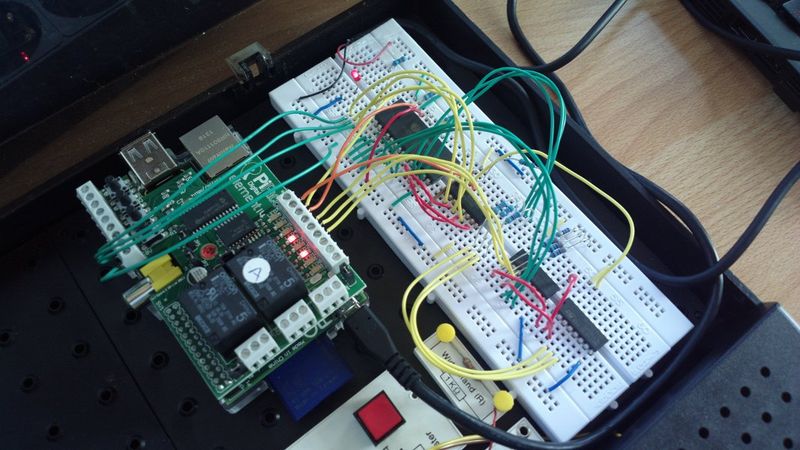
And now almost 30 years later I still profit from it. Even up to the point that I have put the kits into good use again to prototype a circuit I want to build for use with a Raspbery Pi and a PiFace extension board for some real world interaction. This is kind of electronics 2.0 for me, as this time, it's no longer "only" something on a board that interacts with the real world but extends its reach via the Raspberry Pi over Wi-Fi and into the Internet. Electronics, computers and the net combined. I wouldn't have dreamed of that 30 years ago and I still fascinates me today.

How times have changed. Back then it took hard persuasion or saving money for a long time before I got the first kit and then to buy further extension packs. Today, the world has changed, things have become cheaper and more accessible and if I have an idea that requires additional hardware it can be organized almost overnight via the Internet or going to a local electronics store. Also, money for new stuff is not an issue anymore, which helps tremendously as well.

Are you feeling a bit nostalgic or inspired now and think about getting those experiment kits out of storage again?

Selfoss – How Good It Feels To Use My Own Webservices From Across The Atlantic

Due to Google Reader's imminent demise I've switched over to my self hosted solution based on the Selfoss RSS aggregator running on a Raspberry Pi in my network at home. I've been using it for around two weeks now and it just works perfectly and has all the features I need. And quite frankly, every time I use it I get a warm and glowing feeling for a number of reasons: First, it's because I very much like that this service runs from my home. Second, I very much like that all my data is stored there and not somewhere in the cloud, prone to prying eyes from a commercial company and half a dozen security services. Also, I like that I'm in control and that all communication is encrypted.

Although quite natural today I get an extra kick out of the fact that I am sitting halfway across the globe and I can still communicate with this small box at home. Sure, I've been using services hosted in my home network while traveling abroad such as my VPN gateway and Owncloud for quite some time now but those are always running in the background, so to speak, with little interaction. Reading news in the web browser on my smartphone delivered by my own server at home, however, is a very direct interaction with something of my own far far way.  This is definitely my cup of tea.

French Regulator Says Interconnect Costs Per Subscriber Are Tens Of Cents Per Month

In many countries there's currently a debate fueled by Internet access providers (IAP) who argue that the ever increasing amount of data flowing through their networks from media streaming platforms will lead to a significant increase in prices for consumers. The way out, as they portray it, is to not only get paid by their subscribers but in addition also by the media streaming platforms. In practice this would mean that Google and Co. would not only have to pay for the Internet access of their data centers but in addition, they would also be required to pay a fee to the thousands and thousands of IAPs around the globe.

Unfortunately, I haven't seen a single of these IAP claims being backup up with concrete data on why monthly user charges are no longer sufficient to improve the local infrastructure in the same way as has been happening for years. Also, there has been no data on how much interconnect charges to other networks at the IAPs border to long distance networks would increase on a per user basis. Thus I was quite thankful when the French Telecoms regulator ARCEP recently published some data on this.

According to this article in the French newspaper Le Monde (Google's translation to English here) ARCEP says that interconnect charges per user are typically in the range of tens of cents per user per month. In other words, compared to the monthly amount users pay for their Internet access, the interconnection charge per user is almost negligible. Also, interconnection charges keep dropping on an annual basis so it's likely that effect will compensate the increasing traffic from streaming platforms.

So the overwhelming part of what users pay per month for their Internet access goes toward paying for the costs of running the local access network up to the interconnect point. This means they pay for the facilities, routers, optical cables to the switching centers and from there for the optical cables to street hubs or the traditional copper cables directly from the switching centers to their homes.

Which of these things become more expensive as data rates increase? The cost for the buildings in which equipment are housed remains the same or even reduces over time due to equipment getting smaller and smaller and more centralized so it doesn't go there. Also it's likely that fiber cables do not have to be replaced due to technology improvements that ensure a continuous increase in the amount of data that can be piped through existing cables. That leaves the routing equipment in central exchanges and in street hubs that have to be continuously upgraded. That's nothing new, however, and has been done in the past, too without the need for increasing prices. Quite the contrary.

One activity that is undeniably costly is laying new fiber in cities to increase data rates to the customer premises. Users who take advantage of this, however, are usually paying a higher monthly fee compared to their previously slower connection. And from what I can tell network operators have become quite cost conscious and only build new fiber access networks if they are reasonably certain they get a return for their investment from the monthly subscriber fee.  In other words, this also can't be a reason behind the claim that increasing data rates will increase prices.

But perhaps I'm missing something that can be backed-up with facts?

My Mobile Data Use Last Month

And just a quick follow up to the previous post on my fixed line data use last month, here are some numbers on my mobile data use last month. According to Android's data monitor I've used 367 MB after 439 MB the month before. The number includes:

  • 135 MB for mobile web browsing (due to not using Opera Mini anymore)
  • 55 MB for Google maps (very handy to check traffic on the way from and to work to decide on using alternative routes on a realtime basis)
  • 33 MB Youtube
  • 27 MB for email
  • 20 MB for streaming podcasts.
  • App downloads accounted for 17 MB (new Opera browser)
  • Calendar and address book synchronization required 10 MB

Not included is the data I use for using my notebook on the way to and from work as I use a different SIM card for that purpose for which I have no records. But even if I included that I am pretty sure I would still be well below the 1 GB throttling threshold I have on my current mobile contract.

From a different point of view, however, my mobile data use pales compared to the 70 GB I transferred over my VDSL line at home last month.