If you have commented in the past couple of days you have probably noticed that the comments are not published immediately anymore. Unfortunately I am getting a lot of spam comments at the moment that are not filtered out automatically. As it is less work to approve valid comments for the moment than to remove the spam I've decided to turn off auto-approval of comments. Sorry for the inconvenience, I'll turn it on again as soon as Typepad can handle the spamming…
Category: Uncategorized
Retiring the Dongle Dock
Being a frequent traveler I was one of the first to wish for a product with which I could share a 3G connection over Wi-Fi. My first article about it is back from 2006. It took another two years until in 2008, however, before one of the first easy to setup devices, the Huawei D100 Wi-Fi access point designed to establish an Internet connection over a separate 3G USB stick appeared on the market. Fortunately I was in Austria at the time and could buy an unlocked version for a few euros. I've used it frequently since then and it has become a mandatory travel accessory for me. Now in 2013, however, i.e. 5 years later I am finally about to retire it.
Thanks to Android, Wi-Fi tethering has now become a standard feature of most smartphones and despite having limits such as the number of concurrent Wi-Fi connections it supports, it is sufficient for my use. The range of the Wi-Fi chip in a smartphone is perhaps not as good as that of the D100 but in practice the distances I need to cover in hotel and meeting rooms rooms are no problem for a smartphone. 5 years for a wireless device in use before it is retired is quite a thing. Back in 2008, the N95 was the latest and greatest in terms of technology, just to give you an idea of the timeframe we are talking about.
Impact of Virtual Machines on Idle Mode Power Consumption
Ever since I discovered the benefits of running Virtual Machines on my notebook for a variety of things and how easy it is in practice I usually have three of them running at the same time. Yes, three of them at the same time and with 8 GB of RAM and using Ubuntu as host operating system makes the experience quite seamless.
A second Ubuntu is usually running in one virtual machine so I can quickly try out things, install programs I only need for a short time and don't want to linger around on my system and to run a TORified Firefox against unfriendly eavesdropping of half the world's security services. Also, by disabling the virtual network adapter and mapping a 3G USB stick or USB Wi-Fi stick directly into the virtual machine gives me a completely separated and independent second computer. Great for networking experiments. The other two machines usually run an instance of Windows XP or Windows 7 for programs that aren't natively available under Linux. There aren't a lot of those but they do exist. As the VMs are usually not in the way I usually start them but never terminate them unless I need to reboot the host. The only thing I noticed is that there is a power consumption impact.
When I was recently taking a long train trip I noticed that the remaining operation time indicated in the status bar was about one hour longer than usual. I was puzzled at first but soon noticed that the difference is that I had just rebooted the day before and I didn't have the need for a VM running since. It's obvious that VMs have an idle power consumption impact because instead of one OS there are usually four operating systems performing their background operations during idle times on my notebook. So while I was surprised I really shouldn't have been. But the takeaway from this is that in the future I know of a good way to increase the autonomy time in case I need it.
The Map On Paper In the Car On The Way Out
I always like to have a backup plan in place in case something goes wrong. For that reason I have kept a paper map of Europe in the car, just in case there's a problem with the maps and navigation app on my smartphone de jour. But recently I noticed that I can't remember when I've last taken it out!?
Honestly I can't and it must be close to 10 years that I haven't used it. This, the fact that the map must now be pretty out of date anyway and usually having more than one device that can run a navigation app with me these days make me think that the map is about to be discarded. Or perhaps I should keep it for historical reasons? The last paper map I bought…
Like telephone booths and coins that are fading away it's one of these things which mobile devices, mobile voice and mobile Internet access have made superfluous. Can you remember the last time you've used a paper map for navigation or orientation?
The ‘Must Read’ Book If You Want To Understand How A Processor Works
When it comes to computers I always had something of a blind spot: I know how memory works, what Boolean logic is, how a computer adds and subtracts, I know what a bus is, what registers are, how to program in machine language, etc. etc. However, I never really quite figured out how the CPU makes data go from RAM to the ALU and, after processing, back to RAM. I always had a vague idea how it works but the control unit with fixed control paths or driven by what is called microcode pretty much remained a black box. Recently I started looking into this topic again and found a number of sources that explain in simple words how a processor works, including the control unit.
An incredible resource I found is a book called "But How Do It Know – The Basic Principles of Computers for Everyone" by J. Clark Scott. I wouldn't have thought it's possible but within 30 minutes with this book understood how a control unit in a CPU works (based on my previous understanding of how all other parts worked). And I didn't only understand only sort of how it works, but how it really works. The book describes how a CPU and memory works in less than 150 pages and although that might be considered short it goes into the details down to the gate level. And it does it in a language that can be understood by anyone even without prior knowledge of electronics. Over decades I tried to understand how this works and always had to abort my efforts at some point. And then the mystery is solved by the book in 30 minutes. It's almost shocking as is the price of only 16 Euros for the paperback version.
There's a 20 minute video on Youtube that is based on the book, also highly recommended. While the video is great, you should keep in mind, however, that the book goes into much more detail without becoming complicated or boring. Yes, I am very enthusiastic about the book, it has been a real eye opener.
While the book describes a traditional 'wired' control unit with gates, some processors also use a "microcode" based control unit. That sounds even more complicated but if you have good prior knowledge of how a CPU works (e.g. by reading the book above) and then have a look at this project that shows how to build a CPU on your own that uses a microcode based control unit you'll see that a microcode based control unit is actually simpler to understand than a traditional control unit with gates. Another revelation for me!
Another Raspi Application: Check and Report Call-by-Call Tariffs
In Germany we have this great system in place since the liberalization of the telecoms industry in the 1990's called "Call-by-Call" that lets fixed line customers select a carrier to use for national and international calls by dialing an additional access code before the telephone number. In practice it has significantly spurred competition and has brought prices down. But there's also the danger that some black sheep change prices quickly, first getting customers with low prices and then increasing their price ten fold over night without informing them. But there are two cures now:
The first cure is that call-by-call carriers now have to play an announcement before each call to inform customers of the true cost. Problem fixed one might thing. Well not quite because my use of call-by-call is a bit different. I mostly use it for calling abroad from my mobile. Direct calls to international numbers are prohibitively expensive, somewhere between a Euro or two a minute. The same calls from my fixed line at home are in the order of 2 to 3 cents a minute. So the solution for me I have used over many years is to call one of my fixed line numbers at home which is permanently forwarded to one of the few international destinations I call frequently. Praise to home ISDN that gives one several phone numbers (5 in my case). The catch when combining unconditional call forwarding and call-by-call is that no announcement is made because it's not the caller that pays but the forwarder. So my problem was how do I get informed of price hikes?
In the past I manually had to look up prices and was sometimes surprised by the price hikes. Well, no more because now one of my Raspi's does the job for me. With the background I have gained when programming my water alarm system with email notification and the automatic download and backup of all pictures of this blog recently I could quickly put together a script and a Phyton program invoked by cron once a day to download the web page with the prices of my current call-by-call provider, parse it for the prices to the destination countries I'm interested in, extract the price, compare it against maximum values defined and send me an email with the prices and a general verdict in the subject line if everything is still o.k. And with the code for sending an email already there from my previous project and the knowledge I have gained previously of how to parse through strings in Python it took less than two hours to get it working.
Another cloud service at home, excellent! So why am I writing about this? Well, first of course because I'm proud to have done it and done it that quickly. But I also write about it because it shows what can be triggered once you have computing resources available at home running 24/7 that you can play around with and use your imagination and creativity.
And if you want to have a look at the code here we go: Download Call-By-Call-Pi-Code
How 2G We Still Were 10 Years Ago
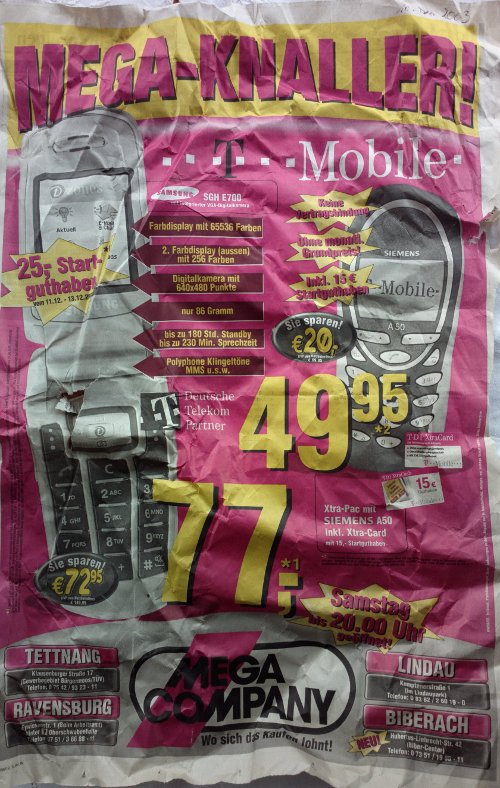
 During a recent basement search session I came across a couple of old newspaper pages I used for wrapping some stuff from December 2003, i.e. from about 10 years ago with advertising on them for mobile phones. I bought my first UMTS phone in December 2004 with hardly any network to use it with where I lived at the time. These advertisement pages predate my UMTS entry by a year and clearly show that UMTS was nowhere in sight then. GSM and GPRS phones being advertised on both pages, MMS and VGA (640×480 pixel) cameras were the highlights of the day. I also wanted to compare prices a bit but based on the information contained in the advertisement it's not really possible. Also no prices whatsoever were given for GPRS. And it was only 10 years ago…
TRIM your SSD
About a year ago SSD prices had fallen to around €300 for a 500 GB drive and I couldn't resist any longer to replace my notebook hard drive for an SSD. The speed-up has been tremendous and I haven't regretted it since. Just for the fun of it I've been keeping a close look at how much data gets written to the SSD and even with a huge safty margin, the 5 GB of data that gets written to the SSD per day with my usage pattern I will not wear out my SSD for at least 30 years. Always ready to optimize, however, I noticed recently, that TRIMing was not activated for the drive.
As the Flash cells contained in an SSD drive can only be rewritten a couple of thousand times, SSDs have sophisticated algorithms to ensure write operations are distributed evenly over the complete drive. That requires that sometimes data of static files that never change is relocated to another part of the drive so those little used Flash cells can be used for something else. This is known as 'wear leveling'.
When a file is deleted, the blocks are marked as empty in the file system. Unfortunately, the SSD knows nothing of file systems as this is a higher layer concepts and SSDs only deal with blocks. That means that once a block is written to the SSD doesn't know whether it contains valid data or whether the block contains to a file that was deleted. In both cases the wear leveling algorithm has to copy the data somewhere else before the block can be reused for other data. This is obviously sub-optimal as a block that contains data of a previously deleted file doesn't have to be copied before it is overwritten.
This is where the TRIM command comes in. When a file is deleted, the file system first deletes the file and marks the blocks the file used as empty. That's standard procedure. But then, in addition, it sends a TRIM command to the SSD informing it that the block is empty. The SSD can then also mark the block as empty and doesn't have to bother copying the useless data it now contains when that block is due for wear leveling replacement.
By default, Linux has TRIM disabled but it's pretty simple to activate it by putting the "discard" option in /etc/fstab for the partition that resides on the SDD. Here's an example:
UUID=xxxxxxxx-xxxx-xxxx-xxxx-xxxxxxxxxxxx / ext4 discard,errors=remount-ro 0 1
After a reboot TRIM should be activated. This post explains how to make sure it is active. And for more details on TRIM here's the Wikipedia entry!
Can You Blanket Germany with 10.000 LTE Base Stations?
Teltarif recently reported that one of the mobile network operators in Germany has pledged that they will blanket Germany with LTE by 2015 by using 10.000 LTE base stations. I wonder if that number is correct, however, as according to their Wikipedia entry they currently have 20.000 GSM base stations and 13.000 UMTS station to cover the nation. So either the wrong number of base stations has been reported, somebody is delusional or it's a marketing gag!? 2015 is not far away so we'll see soon.
Owncloud 6 Months Later – A Status Report
Half a year ago two things came together that reconciled me with cloud computing: A Raspberry Pi, an inexpensive Linux computer than I can run 24/7 at home as it requires very little power and Owncloud, a piece of open source software that lets me, as its name says, run my own cloud services at home. Not trusting web companies to keep my private data safe even before the recent PRISM revelations I could not export my private data to web based companies. So until then, even though it would have been convenient, I didn't synchronize my calendars and address books on different devices and also did not use cloud storage for exchanging files between different devices and to make them available to others. Obviously when I got things working for the first time I was overjoyed. But how has the setup fared in the past 6 months as routine has set in?
Contacts
In short, it has performed beyond my expectations. Address book synchronization between my Android based mobile devices and Owncloud works like a charm. The only glitch I found so far is that when I rename a contact via the Web interface the change is not propagated to my mobiles. If I do the same on a mobile device, however, the change is properly synchronized. Changes in all other fields are synchronized just fine both ways. Since names of contacts usually change very little that's something that can easily be lived with.
Another thing, due to the limited speed of the Raspi is that it takes a while for the pictures of my contacts to show up in the web interface, even for those contacts that I don't have any pictures and thus get a neutral logo. This has the effect that when I just want to quickly go to my contacts on the PC and then change something it takes a bit for the dialog box that pops-up with the contact's information to become editable. This is not a bug but rather a bit of a usability issue and again not something that stands in the way of an otherwise great usability experience.
Calendar
Calendar synchronization has become even more important to me than address book synchronization across Thunderbird/Lightning on the PC and Android based devices. The Owncloud calendar can be used in Thunderbird with or without a local copy. Over time I noticed that when keeping a local copy, Thunderbird refuses at some point to let me delete some entries while I can delete others just fine. I haven't found a pattern in the behavior but it's not a problem in practice as the online mode that just caches information in Thunderbird for times when a connection to the server is not available works without a flaw. The only downside of online mode is that for adding, removing or changing an entry, Thunderbird needs to have a connection to the Owncloud server. Again, only a problem when I'm not connected, which is pretty much only when I'm on a plane. And even then, I can modify the calendar on my mobile device and changes are synchronized back to Owncloud and Thunderbird as soon as connectivity is reestablished.
File Sharing
I use Owncloud's file storage for sharing files between different devices of my own and also to share files that are too big to be included in emails. Individual files or complete directories can be shared with others without the need for an Owncloud account for the person on my server by generating a link that can simply be clicked. Again, this works great in practice.
A feature requests for the future would be for Owncloud show pictures in externally shared directories with the same gallery option as it does when I view them myself or if I share them with another Owncloud user on my sever. Also, when sharing only a single file the download button should be more in the center of the web browser rather than on the top right for users to find it more easily. Nobody's complained to me about it but I find the layout a bit odd. And finally, I'd like to see an option for external sharing that does not only give me a URL that can be used in my home network but in addition a URL that can be used externally. Today I copy/paste the URL to an email and then replace the beginning of the link with my externally visible URL and a different TCP port number. Not a problem for me but normal users struggle a bit with this.
Summary
Yes, I know, there are a lot of other applications for Owncloud but those three are the ones I use on a daily basis. I can't say this often enough, the combination of a Raspi and Owncloud has been a real game changer for me as I now enjoy the benefits of cloud services without the need for putting my private data out of my zone of trust.