If you think fake base stations are 'only' used as IMSI-catchers by law enforcment agencies and spies, this one will wake you up: This week, The Register reported that 1500 people have been arrested in China for sending spam SMS messages over fake base stations. As there is ample proof available how easy it is to build a GSM base station with the required software behind it to make it look like a real network I tend to believe that the story is not an early April fool's day joke. Fascinating and frightning at the same time. One more reason to keep my phone switched to 3G-only mode as in UMTS, mutual authentication of network and device prevent this from working.
Author: Martin
USB 3.0 In Mobile Chipsets
Today I read for the first time in this post over at AnandTech that chipsets for mobile devices such as smartphones and tablets are now supporting USB 3.0. I haven't seen devices on sale yet that make use of it but once they do one can easily spot them as the USB 3.0 Micro-B plug is backwards compatible but looks different from the current USB 2.0 connector on mobile devices.
While smartphones and tablets are still limited to USB 2.0 in practice today, most current notebooks and desktops support USB 3.0 for ultra fast data exchange with a theoretical maximum data rate of 5 Gbit/s, which is roughly 10 times faster than the 480 Mbit/s offered by USB 2.0. In practice USB 3.0 is most useful when connecting a fast external hard drives or SSDs to another device, as these can be much faster than the sustainable data transfer rate of USB 2.0, which is around 25 MByte/s in practice. As ultra mobile devices such as tablets are replacing notebooks to some extent today, it's easy to see the need for USB 3.0 in such devices as well. And even smartphones might require USB 3.0 soon, as the hardware has become almost powerful enough for them to be used as full powered computing devices such as notebooks in the not too distant future. For details see my recent post 'Smartphones Are Real Computers Now – And The Next Revolution Is Almost Upon Us'.
Making use of the full potential of USB 3.0 in practice today is difficult even with notebooks that have more computing power than smartphones and tablets. This is especially the case when data has to be decrypted on the source device and re-encrypted again on the target devices as this requires the CPU to get involved. This is much slower than if the data is unencrypted and can thus just be copied and pasted from one device to another via fast direct memory access that does not require the CPU. In practice my notebook with an i5 processor can decrypt + encrypt data from the internal SSD to an external backup hard drive at around 40 MByte/s. That's faster than the maximum transfer speed supported by USB 2.0 but way below what is possible with USB 3.0.
German EMail Providers Are Pushing Encryption
Recently I reported that my German email providers have activated perfect forward secrecy to their encryption when fetching email via POP and SMTP. Very commendable! Now they are going one step further and are warning customers by email when they use one of these protocols without activating encryption (which is the default in most email programs). In addition they give helpful advice on how to activate encryption in email programs and announce that they will no longer support unencrypted email exchange soon. This of course doesn't prevent spying in general as emails are still stored unencrypted on their servers so those with legal and less legal means can still obtain information for targeted customers. But what this measure prevents is mass surveillance of everyone and that's worth something as well!
How To Securely Administer A Remote Linux Box with SSH and Vncserver
In a previous post I told the story how I use a Raspbery Pi in my network at home to be able to get to the web interfaces of my DSL and cellular routers in case of an emergency. In the light of recent web interface breaches when they are accessible on the WAN side of the router I guess it can be seen as a reasonable precaution. Only two things are required for it, a vncserver running on the Linux box and ssh. If I had known it is so easy to set up and use I would have done similar things already years ago.
And here's how to set it up: On the Raspberry Pi I installed the 'vncserver' package. Unlike packages such as 'tighvncserver', this version of VNC creates starts its own X Server graphical user interface (GUI) that is invisible to the local user rather than exporting the screen the user can see. This is just what I need in my case because there is no local user using the Rapsi and there's no X Server started anyway. When I'm in my home network I can access the GUI over TCP port 5901 with a VNC client and I use Remmina for the purpose. Once there I can open a web browser and then access the web interfaces of my routers. Obviously that does not make a lot of sense when I'm at home as I can access the web interfaces directly rather than using the Pi.
When I am not at home things are a bit more difficult as just opening port 5901 to the outside world for unencrypted VNC traffic is out of the question. This is where SSH (secure shell) comes in. I use SSH a lot to get a secure command line interface to my Linux boxes but ssh can do a lot more than that. Ssh can also tunnel any remote TCP port to any local port. In this scenario I use it to tunnel tcp port 5901 on the Raspbery Pi to port 5901 on the 'localhost' interface of my notebook with the following command:
ssh -L 5901:localhost:5901 -p 43728 pi@MyPublicDynDnsDomain.com
The command may look a bit complicated at first but it is actually straight forward. The '-L 5901:localhost:5901' part tells SSH to connect the remote TCP port 5901 to the same port number on my notebook. The '-p 43728' tells ssh not to use the standard port but another port to avoid automated scanners knocking on my door all the time. and finally the 'pi@MyPublic…' is the username of the pi and the dynamic dns name to get to the Raspi over the DSL or cellular router via port forwarding.
Once SSH connects and I have typed in the password, the VNC viewer can then simply be directed to 'localhost:1' and the connection via the SSH tunnel to the remote 5901 port is automatically established. It's easy to set up, ultra secure and a joy to use.
If You Think Any Company Can Offer End-to-End Encrypted Voice Calls, Dream On…
I recently came across a press announcement that a German mobile network operator and a security company providing hardware and software for encrypted mobile voice calling have teamed up to launch a mass market secure and encrypted voice call service. That sounds cool at first but it won't work in practice and they even admitted it right in the press announcement when they said in a somewhat cloudy sentence that the government would still be able to tap in on 'relevant information'. I guess that disclaimer was required as laws of most countries are quite clear that telecommunication providers are required to enable lawful interception of the call content and metadata in real time. In the US, for example, this is required by the CALEA wire tapping act. In other words, network operators are legally unable to offer secure end-to-end encrypted voice telephony services. Period.
Wire tapping to get the bad guys once sounded like a good idea and still is. But from a trust perspective, the ongoing spying scandal shows more than clearly that anything less than end-to-end encryption is prone to interception at some point in the transmission chain by legal and illegal entities. Also, when you think about it from an Internet perspective, CALEA and similar other laws elsewhere are nothing less than if countries required web companies to provide a backdoor to their SSL certificates so they can intercept HTTPS secured traffic. I guess law makers can be glad they came up with CALEA and similar laws elsewhere before the age of the Internet. I wonder if this would still fly today?
Anyway, this means that to be really secure against wire tapping, a call needs to be encrypted end-to-end. As telecom companies are not allowed to offer such a service, it needs to come from elsewhere. Also, this means that there can't be a centralized hub for such a service, it needs to be peer-to-peer without a centralized infrastructure and the code must be open source so a code audit can ensure there are no backdoors. Also, no company can offer the service as it would be pressured and probably required by law to put in a backdoor (see e.g. Lavabit and Silent Circle).
This is quite a challenge and requires a complete rethinking of how to communicate over the Internet in the future at least for those who want privacy for their calls. And without companies being able to provide such a service it's going to be an order of magnitude more difficult. For private individuals this probably means that they have to put a server at home for call establishment and to tunnel the voice stream between fixed and mobile devices behind firewalls and NATs. For companies it means they have to put a server on their premises and equip their employees with secure voice call apps that contact their own server rather than that of a service provider.
While I already do this for instant messaging between members of my household (see my article on Prosody on a Raspberty Pi) I still haven't found something that could rival Skype in terms of ease of use, stability and voice + video quality.
What If Skype Stopped Working On Linux Tomorrow?
Now here's a bit of a worrying thought: What if Microsoft decided tomorrow to cease support of the Skype Linux client tomorrow?
I recently had that thought after Microsoft yet again changed their terms and conditions to give them even more rights to store and analyze transactions. Long gone are the days in which Skype stood for a secure system with end-to-end encrypted connections nobody could snoop on. From that point of view one should not use it in the first place anyway and I have reduced it's use to the bare minimum.
I'm sure I could find and use an alternative with friends that think likewise but for communication with most people that's just not an option. If I want to talk to them or see them I have to use Skype and that's unlikely to change.
So coming back to the original question what I would do if Microsoft ceased Skype Linux support? After a worrying minute I came up with the answer that I'd probably just use it on an Android tablet (or an Android smartphone) that I have with me anyway for media consumption and on which I don't have personal data. Perhaps I should even do that now as I am not really comfortable to run closed source software on my Ubuntu system in the first place.
Time to experiment with this option.
Almost 4G in St. Petersburg
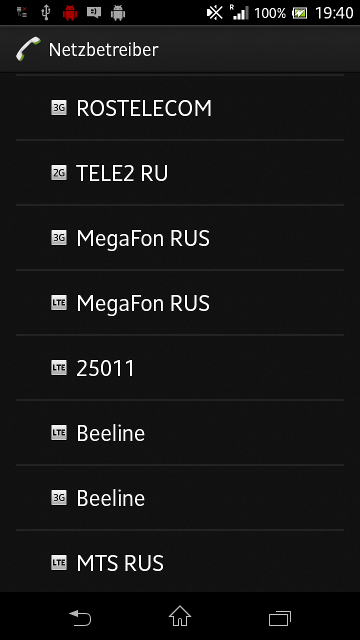 Today I have some tidbits of information on the state of LTE deployment in St. Petersburg in addition to my previous post on 3G. Despite my Russian SIM card of MTS proclaiming '4G' I did not yet get LTE service. However, my mobile already picked up four LTE networks so activation is probably not far away anymore or has perhaps already happened in the networks for which I did not have a SIM card.
With some additional digging I was able to get some more details:
The four networks shown in the screenshot are actually three physical networks as Yota and Megafon share a single 15 MHz carrier in a MOCN (Multiple Operator Core Network) setup in LTE band 7 (2600 MHz). That's probably not surprising as a quick Google search revealed that Yota was bought by Megafon last year. SIB-5 announces a 5 MHz carrier in band 20 (digital dividend 800 MHz) but I didn't pick up a signal there. And finally my German SIM card was properly rejected with cause code #15 (no suitable cells in this tracking area) to encourage an Inter-RAT cell reselection to 2G or 3G.
MTS is also active in Band 7 (2600 MHz) but 'only' with a 10 MHz carrier. My German SIM card was somewhat rudely rejected with cause code #111 (protocol error unspecified). While it serves the purpose it doesn't encourage the mobile to do an InterRAT reselection instead of looking for an alternative network operator which might not be good for capturing roamers. Perhaps something to look at in case anyone from MTS reads this post… But at least the network didn't send an 'EPS and non-EPS services not allowed' which would have made the mobile never to try the network again. No, I'm not kidding, I've seen this reject cause in the past in other networks. As my Russian MTS SIM card does not get service on the LTE layer I assume that the network is not yet live for real customers. I also get this impression from the 'intraFreqReselection' parameter which is set to 'not allowed', which is quite unusual, even in test networks.
And finally, Beeline was also present in Band 7 (2600 MHz) with a 10 MHz carrier and my German SIM was also rejected with cause code #111 (protocol error unspecified).
So no LTE for me this year but perhaps there will be service should I return next year. Let's see.
And On The Way From The Airport… Welcome to Abkhazia
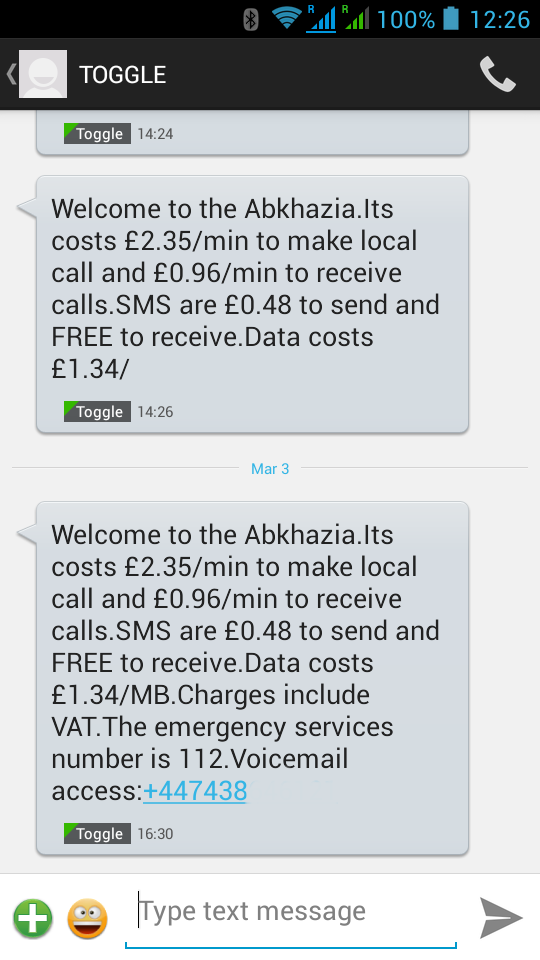 … and a quick follow up on my previous post about my 3G experiences in St. Petersburg. While in some places one can buy a local SIM card directly at the airport, St. Petersburg doesn't seem to be one of them. So as I first had to get to the city before I could buy the local SIM card for Internet connectivity I had to use another means to get to my email after landing and to get the data for my GPS receiver to get a quick location fix.
Using my home network SIM for the purpose was out of the question, roaming charges in Russia are way beyond anything reasonable. But my Toggle SIM offered an almost reasonable rate for small data transfers, 1.34 (UK) pounds per megabyte, altough it thought I was in Abkhazia. Well, not quite 🙂 Looking at the billing records, the 1.34 pounds are charged for every PDP context activation so you better leave the context up if you are reasonably sure there is only little data transferred until you have the local SIM card.
3G Experiences in St. Petersburg – Russia – in 2014
 Last year I had a devastatingly bad 3G experience in St. Petersburg and when returning this year I was a bit skeptical of how good my connectivity would be when not at the hotel or when using one of the almost ubiquitously distributed Wi-Fi hotspots in the city. So here's a little report of how it worked out this time:
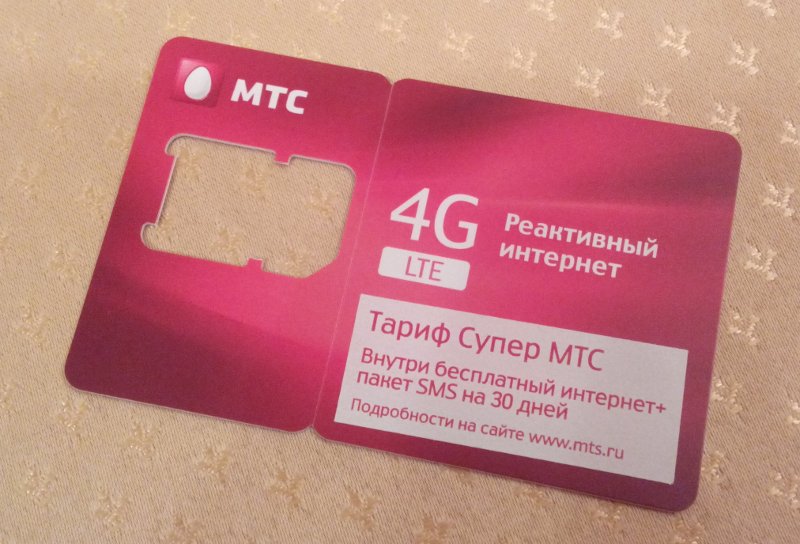
Instead of a Beeline I went for Internet connectivity of MTS this time. Getting the SIM card took about 15 to 20 minutes of intensive interaction of the sales person with her computer terminal, still quite a different exprience compared to other countries where working SIM cards can be drawn out of machines at the airport in about 10 seconds.
Anyway, once activated I got reliable service inside the city and I saw sustained data rates of up to 6 Mbit/s in the downlink direction and around 1-2 Mbit/s in the uplink direction. That's solid service I would say. Thanks to Google's global APN lists in Android, there's also nothing to configure anymore on the mobile as the APN was set automatically to 'internet.mts.ru'.
Last year I came here with my Nokia N8 and could take great pictures but was a bit hampered distributing Internet connectivity to my other devices in the few cases I could get usable cellular connectivity. This year I had a couple of low- to mid range Android devices in tow and while Wi-Fi tethering capabilities made connectivity sharing easy, picture quality compared to last year visibly suffered. I just wished I could have it all in one (affordable) device. Next year perhaps.
Pricing for Internet is also quite affordable. I paid a total of 350 Ruble (around 7 Euros) for the SIM card including 300 Ruble balance on it. Out of those, unlimited Internet access for a month cost 250 Rubles, i.e. around 5 Euros. The daily cap is set to 100 MB after which the data rate is throttled. More than sufficient for my purposes. For the remaining 50 Rubles I sent a couple of SMS messages and made some local calls. Altogether a very positive experience!
P.S. While LTE seems to be available from MTS in Moscow and 4G is already printed on the SIM cards it's not yet available to the public in St. Petrsburg. However, there are already three LTE networks on air so it can't take long anymore now.
Raspi, Ubuntu and Co and How They Compare to Cooking vs. Instant Food
The title of this post is perhaps a bit long winded but it contains an interesting analogy I've recently come up with when I was explaining the concept of hosting my own cloud services at home to a friend rather than using similar services of large Internet based companies.
Having my own cloud services at home and maintaining them vs. using services of Internet based companies to me is like doing some real cooking versus just consuming instant food. Internet based companies offer services that are relatively easy to install and use, i.e. that's quite similar to instant food that heats up in microwave in a few minutes. There's a price to pay, however, less tasty in case of fast food, perhaps, and sharing your private data for analysis and use by an Internet company in the other.
Hosting your own services at home is obviously more work just as preparing a meal from fresh ingredients is more work. However, my data remains private and secure which is similar to a self prepared meal which is more tasty if the cook knows what he is doing.
I like the analogy because it also fits when people say "great that you do it but I lack the skills and time of doing it myself". I hear the same argument when people talk about instant food vs. cooking. Sure If you've never stood in front of a stove before, learning how to cook is likely to be a challenge and someone to help getting you started is surely a good thing. The same is true for hosting your own services at home or switching to an opern source operating system such as Ubuntu Linux.
To summarize: Yes, when it comes to using cloud based services and operating systems I definitely prefer cooking to instant food.