Computer mice can be difficult. Some time ago I wrote about my notebook occasionally behaving strangely, which drove me crazy. I suspected all sorts of issues until I finally realized that the second Bluetooth mouse in my backpack was responsible for the erratic behavior. Now I have another mouse story that was equally baffling: An occasionally slow right mouse button.
Continue reading The Story of the Slow Mouse ButtonThe Android “Lockdown” Button
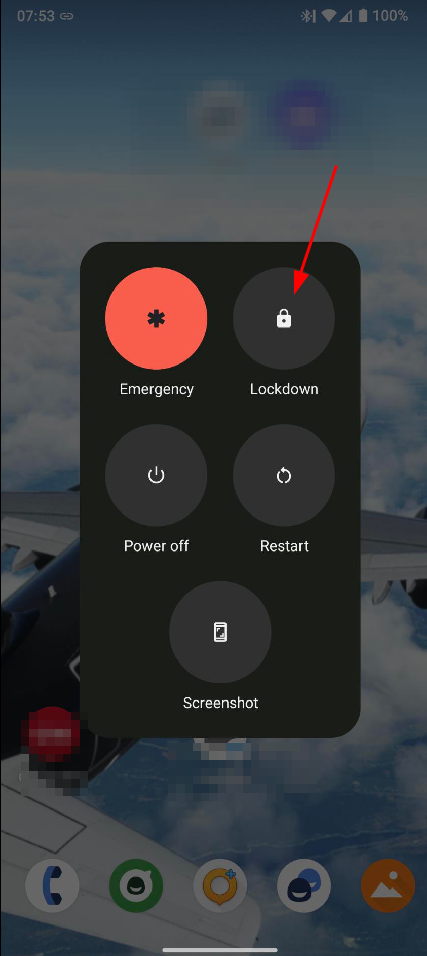
I’m not really a friend of biometric unlocking of my mobile devices for security reasons. But, I have to admit, I use the fingerprint reader on some of my devices anyway, it is just too convenient. I know, it’s not consistent behavior. But a few days ago, I saw this post on Mastodon that made me aware of the ‘Lockdown’ button in the Android menu that appears when pressing to on/off button for a second. I’ve used this menu many times but I never noticed the ‘Lockdown’ button. So what does it do? When pressed, it disables the fingerprint reader until the PIN code for the device has been typed-in again. In practice, it’s easy and quick to get to the button in case of need, even while the phone is locked in the first place but could be unlocked with the fingerprint reader. Great, this significantly changes the security / convenience balancing act for me!
P.S.: Not all Android UI flavors do have the button, but it is present in stock Android (but perhaps needs to be activated in a menu) and LineageOS (active by default). Good enough for me.
Roaming Report – Part 9 – Frequency Bands used for LTE and 5G in the US – Operator 3
There are three nationwide LTE/5G networks in the US. As I could roam in all three of them when I was recently in the US, I also had a look at the bands that are requested by the third network to be reported by the UE. So here are the results:
Continue reading Roaming Report – Part 9 – Frequency Bands used for LTE and 5G in the US – Operator 3Roaming Report – Part 8 – Frequency Bands used for LTE and 5G in the US – Operator 2
Yes, the post titles are getting a bit long these days. Sorry about that. In this part, let’s have a look which 4G LTE and 5G NR bands for 5G Non-Standalone (NSA, ENDC) another nationwide US network requests my mobile devices to report and how this differs from the network I had a look at in the previous post.
Continue reading Roaming Report – Part 8 – Frequency Bands used for LTE and 5G in the US – Operator 2Roaming Report – Part 7 – Frequency Bands used for LTE and 5G in the US – Operator 1
As I live in Europe, I pretty much know the EU LTE and 5G frequency bands by heart. In North America, however, the frequency ranges and particularly the band numbers are significantly different, so I had a closer look which bands my devices were using while having been there, and which bands the networks asked my devices to report back in their band support list.
Continue reading Roaming Report – Part 7 – Frequency Bands used for LTE and 5G in the US – Operator 1Roaming Report – Part 6 – 5G Roaming in the US fixes the lack of no LTE-CA on some Devices!
When I was last in the US back in 2019, I noticed that quite a number of the test smartphones (from the EU) I had with me would not do LTE Carrier Aggregation (CA). Even worse, my devices where often sent to a 5 or 10 MHz Carrier, so data transfer speeds were abysmally slow in the single digit Mbps range. Already back then, I found such a device behavior pretty strange but hoped that time would fix this. Fast forward to 2024 and my recent visit to the US, where I could have another look:
Continue reading Roaming Report – Part 6 – 5G Roaming in the US fixes the lack of no LTE-CA on some Devices!Roaming Report – Part 5 – Double Inter-Continental Voice Delay
And yet another roaming story from my recent trip to North America: For voice and video calls to family and friends, I use my Prosody XMPP server in Germany, a voice stream reflector that is also located in the country and the ‘Conversations’ messenger app. By having all components close together, the speech path delay is minimal. But when roaming to North America, the round trip delay time to and from Germany is around 300 milliseconds when connected to an LTE network. That’s quite a bit longer than what I would have expected, as the RTT time from one of my servers in Germany to ‘archive.org’ that is hosted in San Francisco is around 160 ms.
But let’s stick with the 300 ms round trip time for now, which means there is a 150 ms one way delay, i.e. the delay between mouth to ear. However, if both ends of the conversation are at the far end of North America, e.g. in California, while the voice reflector is in Europe, the mouth to ear delay doubles, i.e. it is around 300 milliseconds. ITU G.114 recommends a mouth to ear delay of less than 150 ms for conversational calls, so the 300 ms are way beyond this recommendation. So how does that sound like in practice?
To find out, I established a ‘Conversations’ voice call over two LTE/5G ENDC connections between two smartphones and observed the delay. And indeed, the delay is quite obvious, but it is still possible to have a normal conversation, albeit with a bit of silence when the direction of the conversation changes.
If I was at the North American west coast for a longer time than just for a week or two and wanted to use ‘Conversations’ for local calls, I would obviously change my setup: SIM cards with LTE P-GWs on the continent and a media reflector somewhere here as well. In other words: The Edge is still important!
Roaming Report – Part 4 – When the SIM card talks to the Internet
Here’s a quick follow-up to my recent blog post on using an eSIM when roaming in the US: After I installed the eSIM, I noticed with my trace tools that whenever my smartphone connected to an LTE network, the phone would, in addition to the LTE PDU session for Internet connectivity, request another PDU session with another APN (Access Point Name). This was not configured anywhere in the device. The PDU session just lived for a few seconds and was then terminated again. I was a bit puzzled at first but soon had a suspect… the SIM card.
Continue reading Roaming Report – Part 4 – When the SIM card talks to the InternetRoaming Report – Part 3 – Airalo – 5 Minutes to the eSIM
After a bit of a disappointing prepaid eSIM (non-) experience directly from US network operators, I switched to plan B and had a look if I could get an eSIM for use in the US from one of the global eSIM roaming platforms. Two years ago, I checked out Airalo when I was roaming in Europe, and was quite happy with the result.
Continue reading Roaming Report – Part 3 – Airalo – 5 Minutes to the eSIMRoaming Report – Part 2 – Getting a Local US eSIM – How Hard Can it Be?
While I was in the US, I was using my German SIM card to roam through the different networks. When using a German SIM card, however, all IP data traffic goes back from the US to Germany and from there to the Internet. As the servers for my self-hosted services are in Europe, that’s not much of a problem. However, I also wanted to test some of the US specific features / limitations of mobile Internet access, and was prepared to spend some money to get a Prepaid eSIM from one of the US network operators. Prices in the US are significantly higher than in most countries in Europe, but it would not have kept me away. It turned out, however, that getting a prepaid eSIM from US network operators is not straight forward.
Continue reading Roaming Report – Part 2 – Getting a Local US eSIM – How Hard Can it Be?